REVIEW · NAPLES
Naples: Pompeii Self Guided Audio Tour
Book on GetYourGuide →Operated by ITGUIDES · Bookable on GetYourGuide
Pompeii feels manageable with a phone guide. With the ITGUIDES app, you get a geolocated map and 60+ points of interest (audio, photos, and text) so you can move around the ruins in your own rhythm. At $4.70 per person, it also claims big savings versus an on-site audioguide, and the recordings are yours to reuse for future visits.
The main thing to watch is that Pompeii can be spotty for connectivity, so plan to download the guide contents ahead of time. If you wait until you’re inside and the signal is weak, you might lose some of the seamless experience.
In This Review
- Why This Self-Guided Audio Tour Works at Pompeii
- Key Points at a Glance
- Price and Value: What You’re Really Buying for $4.70
- Getting the ITGUIDES App Working Before You Enter Pompeii
- How the Offline, Geolocated Map Changes Your Walk
- A Practical Route: Amphitheater to the House of the Vettii (Without Feeling Rushed)
- The Amphitheater: Start With the Stage of Pompeii
- The House of the Vettii: Read the Domestic World in Pieces
- The Lupanare (Brothel): Learn the City’s Private Economy
- Roman Baths: Understand the Systems, Not Just the Rooms
- The Food, Bread, and Wool Stories You’ll Actually Remember
- App Behavior, Duration, and Realistic Expectations
- What You Might Like Most (Based on Common Feedback Patterns)
- Who This Self-Guided Pompeii Audio Tour Suits Best
- Should You Book This Pompeii Self-Guided Audio Tour?
Why This Self-Guided Audio Tour Works at Pompeii
This setup is built for the way Pompeii actually hits you: not all at once, and not in a straight line. You’re surrounded by streets, houses, and public buildings, and it’s easy to feel like you’re walking through “ruins” instead of a real city. The app’s map and geolocated points help you connect what you’re seeing to the story attached to it.
I also like that it’s not just audio. Each stop includes hypertext descriptions, and when names or technical terms appear, you can click for extra context (like gods, heroes, or practical Roman-life vocabulary). That means you can skim when you’re tired and slow down when something grabs you—like the way the ancient Roman baths worked or how bread and wool processing were handled.
Key Points at a Glance
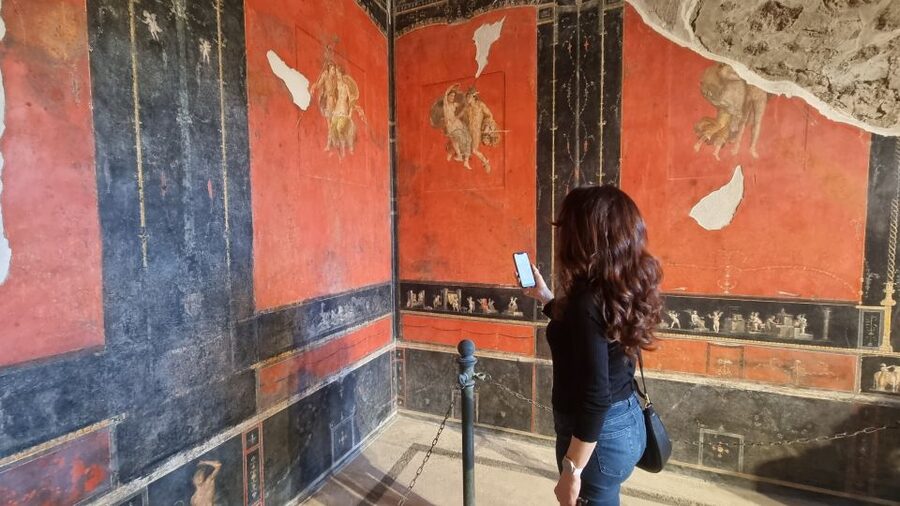
- 60+ geolocated points with audio, photos, and text, so you’re not guessing what to look for
- Smartphone navigation using a map that helps you move between stops without a fixed route
- Self-paced visiting with a 4-hour window from first activation, starting whenever the ruins are open
- Audio you keep for future trips, not just something tied to one visit
- Offline-first advice, since internet service inside the archaeological site can be unreliable
- Multiple languages (Italian, English, French, German, Spanish)
You can also read our reviews of more tours and experiences in Naples.



Price and Value: What You’re Really Buying for $4.70
At $4.70 per person for a roughly 4-hour self-guided visit, the appeal here is simple: you’re paying for access to interpretation, not a timed group experience. Pompeii is crowded in waves, and guided tours can feel like a sprint. A phone guide flips that. If you want 10 minutes at the amphitheater and 25 minutes at the House of the Vettii, you can do it without negotiating with anyone.
The pricing claim in the tour info is that you save more than 50% compared with buying a ticket-office audioguide. Even if you treat that as an estimate, the underlying value proposition is still strong: you’re getting a curated, multi-stop guide with map support at a low cost, and you’re told you can reuse the audio guide on future visits.
One more practical angle: you’re not buying “information,” you’re buying time well spent. At Pompeii, the difference between enjoying your visit and feeling lost often comes down to whether you know where to look and what each space was for. The app is designed for exactly that.
Getting the ITGUIDES App Working Before You Enter Pompeii
This is a digital tour, so the smoothness starts before you step into the excavations. After purchase, you download the ITGUIDES app from your phone’s app store. Then you use the voucher instructions to enter the app and contact the team through the contact page, sending two key details: your app user ID and your order number (listed as the GetYourGuide order number in the tour description).
A helpful detail from the experience info: support is available via WhatsApp using the number shown in the app menu. One review specifically thanks Vincenzo for fast help getting the audio guide installed and ready, which is a good sign if you tend to get stuck on setup.
Also, don’t treat this like a download-and-go. The tour info explicitly recommends downloading all the contents locally before visiting because internet connection can be poor inside the archaeological site. If you’re traveling with limited data, that offline step matters.
How the Offline, Geolocated Map Changes Your Walk

Pompeii is large enough that “finding your way” becomes part of the experience. What I like about this guide is that it’s not only audio—it’s a geolocated scavenger hunt for the most worthwhile, best-preserved elements.
You’re told there are more than 60 points of interest, and the tour map includes check marks to show what you’ve visited. That feature is more useful than it sounds. Pompeii isn’t laid out for casual wandering, and you can accidentally skip the exact thing you were hoping to see.
That said, there are small app quirks that show up in real-world use. For example, one review notes that when there’s more than one audio clip at a single point, the map check mark sometimes doesn’t appear even though both clips play. Another mentions the app can take you back to the map after listening and zoom out—meaning you may need to zoom in again to find your location.
Those glitches aren’t deal-breakers. They do, however, point to a strategy: before you start, make sure the guide is fully loaded and keep your phone brightness reasonable so you can read the map without squinting.
A Practical Route: Amphitheater to the House of the Vettii (Without Feeling Rushed)

Because this is self-guided, there isn’t a single itinerary you must follow. But you can still plan your visit like a series of mini-missions. Here’s a sensible flow based on the stops the guide highlights.





The Amphitheater: Start With the Stage of Pompeii
If you begin with the amphitheater-related stories, you’ll set context early. Roman amphitheaters weren’t just entertainment spaces—they were political theater, social glue, and a huge part of civic life. The guide is set up to give you stories and curiosities tied directly to what you’re looking at, so you’re not standing there wondering what kind of crowd this building could pack.
Go early in your visit if you can. Even if your start time is flexible, arriving before you feel tired helps. The amphitheater is also a great place to get your bearings with the phone map, since you’ll quickly learn how the app behaves as you move between points.
The House of the Vettii: Read the Domestic World in Pieces
Next, the House of the Vettii is one of those places where you notice details once you know what to look for. The guide includes it as a major highlight, and it’s described in the tour info along with other key sites like the lupanare and Roman bathing areas.
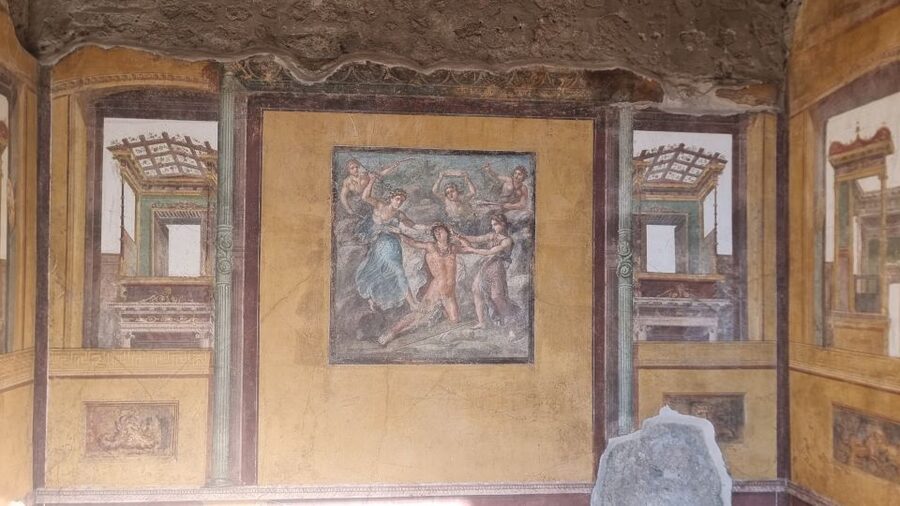
In houses like this, the “wow” is often in surfaces—frescoes and mosaics—and the guide leans into that by pointing you toward some of the best-preserved artwork. The map helps you target the most significant visuals instead of wandering and hoping you catch everything.
The Lupanare (Brothel): Learn the City’s Private Economy
The guide specifically calls out the lupanare, and this is where the audio tour approach feels especially valuable. When you’re standing in a building that was designed for a specific kind of activity, context changes your reaction. You start thinking about how space was organized and what daily life included—beyond the grand public spaces.
I’d treat this stop as a “listen slowly” moment. These areas are easy to rush past because you might not know what questions to ask. The guide’s audio and text are meant to give you the missing basics so your time there feels intentional.
Roman Baths: Understand the Systems, Not Just the Rooms
You’ll also get audio on how the ancient Roman baths worked. This is the type of topic that’s hard to grasp from plain ruins alone. A bath wasn’t one room—it was a system, tied to heating, water use, and routine.
If you pay attention to what the guide explains here, you’ll probably look at other buildings differently too. Instead of seeing “stones that used to be walls,” you start seeing how the technology shaped everyday life.
The Food, Bread, and Wool Stories You’ll Actually Remember

Pompeii isn’t only architecture. It’s a snapshot of daily routines—what people ate, how they made bread, and even how urine entered wool processing. The tour info calls out both bread-making and the use of urine for wool processing, which gives you a sharper sense of the city’s supply chains and everyday economics.
These sections work best when you’re not listening like a textbook. Try pausing after the audio ends, look at your surroundings, and ask yourself where this might have happened in the city. The guide also mentions that on the map you can find the most beautiful and best preserved frescoes and mosaics, so the stories pair with visuals.
App Behavior, Duration, and Realistic Expectations
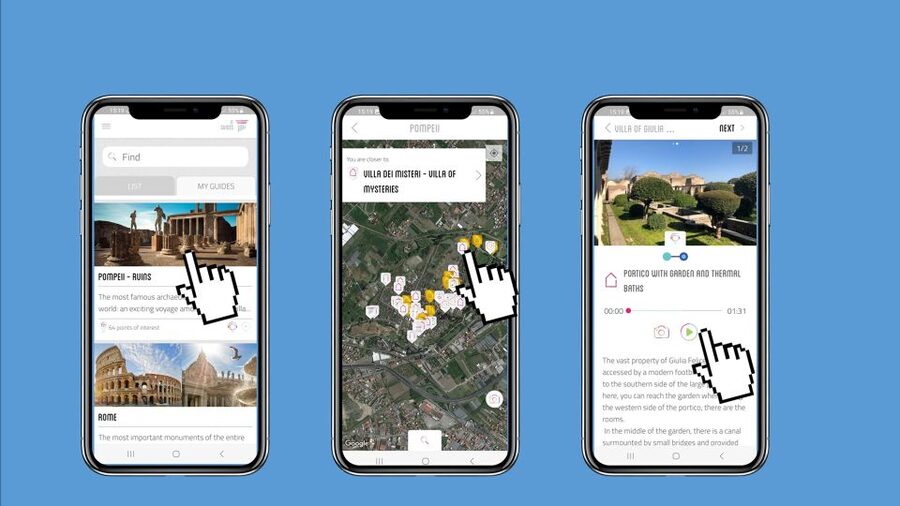
You get an audio guide that runs within a 4-hour valid window from first activation. That’s a useful constraint. It encourages you to pick your “musts” without spending half your day chasing everything.
One review notes that having just two hours felt too short and the person wished they had longer. Another highlights the app as easy to operate with enough information, plus the map helping with movement around the site. Those point to a key expectation-setting: this is long enough to hit the big themes and key points, but Pompeii can easily eat more time if you’re the type who stops for every mosaic.
Also, you can listen both before and during your tour if you download ahead. That’s handy if you like to walk in with a few names and themes already in your head.
What You Might Like Most (Based on Common Feedback Patterns)

The rating is 3.9 from 211 reviews, which tells you this guide is generally seen as good value, with a few predictable app annoyances. The most praised aspects cluster around three things:
- The interactive map and geolocated points that reduce guesswork
- Clear, interesting audio that doesn’t feel like a lecture marathon
- Easy setup and support, with at least one customer praising quick help from Vincenzo
You’ll also see praise for the ability to go at your own pace, and for the way the tour helps you avoid missing key domestic spaces.
The consistent downsides are small but worth knowing: download files beforehand, because connectivity can be weak; and the app may not always return to the exact same map view position after an audio clip. If you’re the type who gets frustrated by app friction, you’ll want to arrive with your phone charged and ready.
Who This Self-Guided Pompeii Audio Tour Suits Best

This experience is best for you if you want flexibility and you’re okay using your phone to navigate. It’s also a great fit if you travel with mixed preferences: someone wants a quick pass, someone else wants to linger at artwork, and the app lets you split that difference without negotiating.
It’s also a smart choice if you’re cost-conscious. At $4.70 per person, you’re paying for interpretation that would otherwise cost significantly more if you bought an audioguide on site.
Less ideal if:
- You’re hoping for a full live guide walking beside you and answering questions in real time (this is self-guided).
- You strongly dislike phone maps or you worry about your phone battery lasting through an outdoor site.
On a positive note, the guide info says the activity is wheelchair accessible. Since it’s a self-guided walk, you can move at your own pace and pause when needed.
Should You Book This Pompeii Self-Guided Audio Tour?
Book it if you want maximum value and a structured way to see the best parts of Pompeii without committing to a group schedule. The geolocated map, the 60+ points, and the mix of audio with photo and text are exactly what helps you turn ruins into a lived-in city.
Pass or reconsider if you know your phone use tends to break down under stress (spotty internet, fiddly apps) or you prefer a human guide to provide context on the fly. If you go that route, you might feel happier with a live tour.
If you do book this one, take the time to download everything before you enter and charge your phone. That single step makes the difference between a smooth walk and a frustrating scavenger hunt.