REVIEW · GETTYSBURG
Gettysburg: Devil’s Den Self-Guided Walking Tour
Book on Viator →Operated by Action Day Trips · Bookable on Viator
Devil’s Den packs a punch. This self-guided Gettysburg audio walk turns a rocky Civil War battlefield into a guided, story-led experience you can do on your own schedule.
What I like most is the hands-free, location-triggered audio that plays as you move, and the way it keeps you oriented on key ground without hand-holding. For $9.99, it’s also a smart way to add depth quickly without paying for a full guided tour.
One thing to plan for: you’ll need to get the app set up correctly before you lose signal. The instructions can feel a bit confusing if you’re expecting a driving tour, and you should only use it when the park is open (Devil’s Den is tied to park closing rules, including sunset).
In This Review
- Key things to know before you go
- Devil’s Den in 30 minutes: what this route really covers
- Starting at Sickles Avenue: how to kick off without a guide meeting you
- App setup and device tips: the biggest make-or-break step
- How the location-based audio works when service drops
- Stop 1: Devil’s Den and the stories you’ll hear along the rocks
- Price and value: $9.99 for lifetime access at one of Gettysburg’s best “short walks”
- What could trip you up: setup confusion, audio failures, and closing time
- Who should book this Devil’s Den audio walk
- Should you book the Devil’s Den self-guided audio tour?
- FAQ
- How long is the Devil’s Den self-guided walking tour?
- Where does the tour start and end?
- Is this a guided tour with a staff member meeting me?
- Does it work offline?
- What do I need to bring?
- How do I start the audio?
- What are the tour hours?
- Can I get a refund if I cancel?
Key things to know before you go
- Hands-free audio by location means you don’t have to tap to keep the story going.
- Offline maps help when cell service drops inside the park.
- Short walk, many story points: about 0.35 miles with 11+ audio stories.
- Start anytime, pause anywhere so photos and slow moments are built in.
- Bring headphones for the best sound and so you’re not juggling your phone speaker outdoors.
- Sunset matters: if the park is closed, don’t count on the tour working anyway.
Devil’s Den in 30 minutes: what this route really covers
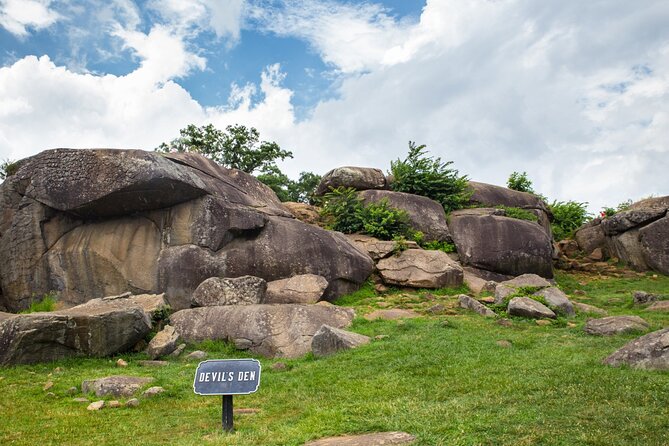
This is a compact walking tour centered on one place: Devil’s Den, famous for being one of the most intense skirmish areas during the Battle of Gettysburg. The total walking distance is listed as about 0.35 miles, which makes it ideal if you’re touring with limited time or you just want a focused hit of Civil War context.
The tour is advertised as 20 to 30 minutes for most people, but there’s also guidance that the complete experience can run closer to 0.5–1 hour, depending on how much you pause, read the area as you walk, and let the extra audio stories play. That range is realistic here because there are more than 11 audio stories, and Devil’s Den is a place where stopping for a moment makes the battlefield feel more tangible.
You also get a simple route setup: you start at Sickles Avenue and the experience ends back at the same meeting point. That means you don’t have to guess how to get back or worry about a complicated loop.
You can also read our reviews of more tours and experiences in Gettysburg.



Starting at Sickles Avenue: how to kick off without a guide meeting you
This is self-guided, so nobody is waiting at the start. The meeting point is on Sickles Avenue, Gettysburg, PA 17325, and the tour begins once you’re standing at the correct spot and launching the right audio experience.
Here’s the practical rhythm:
- After booking, you’ll receive setup instructions (email and text) with a password.
- On-site, you open the separate Action’s Tour Guide App.
- When you’re at the starting story’s point, the audio should begin automatically.
- If you have more than one version of a tour in the app, you’ll want to select the one that matches your planned start direction.
Also, keep expectations realistic: this isn’t a guided talk with a person answering questions. It’s a guided route with a story track. If you’re the kind of traveler who loves being guided but hates relying on a group schedule, that’s a good match.
One more tip: bring headphones or earbuds. The audio is the whole point, and it’s easier to hear clearly on windy days and during quiet moments in the park.
App setup and device tips: the biggest make-or-break step

This tour is designed to work offline, but the offline part depends on doing one thing right first: downloading the tour while you still have strong wifi/cellular.
The tour provider makes this explicit: you MUST download the tour while in strong wifi/cellular. After that, it works offline. So don’t plan to start the download while standing in an area with spotty signal and hope for the best.
Device recommendations are also given:
- iPhone on iOS 15 or later
- Android on version 9 or later
- iPad/tablet with GPS and cellular connectivity
If your phone is older or GPS is spotty, you might find the location-based audio doesn’t trigger as smoothly. That’s not “failure,” it’s just how GPS-driven experiences behave.
Finally, remember the password rule: your password can be used on the same number of devices as the travelers you booked. If you’re sharing the experience, sync up your device choices before you arrive so you don’t end up fighting login on-site.
How the location-based audio works when service drops

Once you’ve got the tour downloaded, the experience is built around motion and position. The audio stories are set up to play on their own based on your location. That means you can keep walking, then listen as the narration cues you forward along the route.
There are a few practical implications for how you’ll experience it:
- You’ll want to stay on the intended walking path and at a reasonable pace, because the system is tied to where you are.
- If you stop for a long time off-route, it may not trigger the next story when you expect.
- If you run into audio issues, there’s a support path mentioned in the help notes, but in practice your best move is to check you’re in the correct tour inside the app before you walk too far.
The offline tools matter here. The app includes offline maps, which is especially valuable in Gettysburg’s park setting where signal can be inconsistent. You’re not guessing where to go next—you’re following the route with the story.
And yes, you can go at your own pace: start anytime, pause anywhere, and enjoy snacks/photos without feeling like you’re falling behind a group. For a short battlefield walk, that freedom is a big deal.
Stop 1: Devil’s Den and the stories you’ll hear along the rocks

The entire tour centers on Stop 1: Devil’s Den. This is where the narration aims to make the ground feel alive. You’re exploring a “strange and rocky” area while also moving backward in time to the Civil War.
The story framing you get is balanced across sides. The narration is designed to follow the footsteps of both Union and Confederate soldiers who fought there. That’s one of the strongest reasons to do an audio approach rather than just reading a sign: you get a guided mental picture of the battle movements instead of only seeing the aftermath.
Because there are 11+ audio stories on a short route, you’ll likely experience Devil’s Den in “layers”:
- A quick orientation on why the place matters
- Multiple story segments as you progress along the trail
- Extra audio that you can keep listening to or skip if you’re short on time
The tour description also emphasizes that the storytelling is meant to feel thrilling and memorable, not dry and distant. In real-world terms, that usually means you’re given enough context to understand what you’re looking at as you walk, without needing a historian’s homework first.
If you like the idea of a guided walk where you don’t have to stare at your phone the whole time, Devil’s Den is a great match—because the audio does the work while the battlefield does the talking.



Price and value: $9.99 for lifetime access at one of Gettysburg’s best “short walks”

At $9.99 per person, this is priced like an add-on, not a major attraction. That’s where the value shines: you can spend a small amount and still get a guided story experience for one of Gettysburg’s key sites.
What you’re buying isn’t just “audio.” You’re buying several practical features that matter when you travel:
- Offline maps and offline functioning after download
- Hands-free listening that follows your location
- Lifetime access with no expiry, so you can reuse it later
- The ability to pause, resume, and go at your own pace
Lifetime access is the big long-term win. If you’re visiting Gettysburg more than once, or you want to replay the walk later, you’re not stuck with a limited-day ticket. It’s also useful if you’re the type who comes back to places and sees new details each time.
There’s also a practical savings note for couples: you can share one tour by splitting headphones. That’s a nice budget-friendly idea if you’re traveling as two and you’re comfortable with one device doing the job.
One more value point: this is close to public transportation, and since the walk loops back to Sickles Avenue, you’re not forced into complicated transit planning just to get to the story site.
What could trip you up: setup confusion, audio failures, and closing time

The overall rating is solid but not perfect. The most common issues are predictable for tech-based tours: setup, confusion, and occasional technical failure.
Here’s how to avoid the most likely problems:
- Read setup instructions carefully before you arrive. One review-style complaint described install instructions as confusing even though it eventually worked.
- Make sure you chose the walking tour version. One reported confusion was tied to mismatched stop numbering that can happen if you’re mixing expectations with a driving tour.
- Download while you have strong signal. Offline is only as good as the download you did earlier.
- Bring headphones. Without them, you’ll be fighting wind and ambient noise, and “audio didn’t work” can sometimes mean “audio wasn’t audible.”
Also, watch the park hours closely. There’s a real-world caution embedded in the feedback: using it after the park closes can become a problem. The ranger incident mentioned in the feedback was about trespassing and the park closing at sunset. Even if the app works, the location rules still matter. Plan the start early enough to finish before closing.
If something truly breaks (login, download failure, app crash), there’s support mentioned, and refunds were processed in at least one case. But your best strategy is prevention: download well, test your audio before committing to a full walk, and keep your expectations flexible if your phone struggles with GPS that day.
Who should book this Devil’s Den audio walk

This tour fits best if you:
- Want a short Gettysburg walk with story guidance but no group pace
- Like history that’s delivered as you’re standing in the place, not just after you leave
- Are comfortable using a phone for navigation and audio
- Prefer pause and photo freedom over touring on rails
It’s also a good choice for solo travelers who don’t want to wait for a particular guide schedule. Because it’s private for your group, it’s more peaceful than many shared guided experiences.
You might reconsider if you:
- Hate fiddling with apps or fear your phone won’t cooperate outdoors
- Need a person on-site to explain what’s happening
- Are likely to arrive at the very end of the day without time to finish
Should you book the Devil’s Den self-guided audio tour?
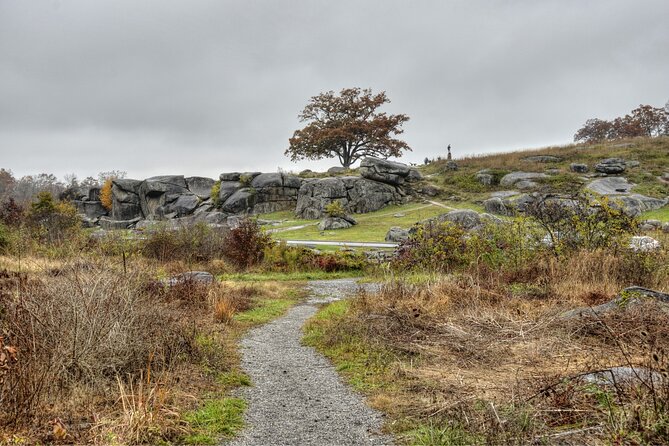
If your goal is a focused Gettysburg experience that gives you context fast, I think this is a good value. $9.99 buys you a short route, location-triggered audio, and offline tools—plus lifetime access so it can become part of your personal Gettysburg library.
My “book it” conditions are simple: download it in good signal, bring headphones, and start early enough to finish before park closing. Do that, and Devil’s Den becomes much more than rocks and markers—you get a guided path through a tough moment of the battle, told in a way that’s meant to keep you moving and listening.
If you’re willing to manage one phone and follow a short route, this tour is a practical way to add meaning to one of Gettysburg’s most memorable spots.
FAQ
How long is the Devil’s Den self-guided walking tour?
The tour is listed as about 20 to 30 minutes. There’s also guidance that the full experience can take about 0.5–1 hour depending on how you move and how many stories you listen to.
Where does the tour start and end?
The tour starts at Sickles Avenue, Gettysburg, PA 17325, and ends back at the same meeting point.
Is this a guided tour with a staff member meeting me?
No. It’s self-guided. You’ll start the first story on-site and follow the audio cues through the route.
Does it work offline?
Yes. It includes offline maps and works offline after you download the tour while you have strong wifi/cellular.
What do I need to bring?
You should bring headphones/earbuds for the best experience. You also need your smartphone or tablet with the recommended GPS-capable setup.
How do I start the audio?
After downloading the tour and entering your password, open the Action’s Tour Guide App once you are at the starting point. The audio should begin automatically when you’re at the first story location.
What are the tour hours?
The listed opening hours for the experience are 6:00 AM to 9:00 PM, Monday through Sunday.
Can I get a refund if I cancel?
Yes. Free cancellation is available up to 24 hours before the experience start time for a full refund. Changes within 24 hours are not accepted.