REVIEW · FLORENCE
Uffizi Gallery: Self-guided App Visit & Optional Accademia Museum
Book on Viator →Operated by CAF Tour and Travel · Bookable on Viator
One museum in Florence can drain your whole day fast. This setup uses timed entry and a self-guided audio app so you spend less time hunting tickets and more time on the paintings. I like the “pick your pace” feel, especially with a 3D map and audio tracks ready in your language, but the main drawback is simple: you’re relying on your own phone (and usually the app needs downloading in advance to avoid connectivity trouble).
The value is strongest if you already know you don’t want an in-person guide. You’ll still get context on major artists like Botticelli, Leonardo da Vinci, Raffaello, and Michelangelo, plus an optional second stop at the Accademia for more Michelangelo. The consideration: if your phone app plan goes sideways, you can lose a lot of the experience, so I’ll show you how to protect yourself.
In Florence, the Uffizi is the one ticket most people try to “wing.” This makes it easier to do it your way—just don’t treat the app like a casual extra.
In This Review
- Key things to know before you go
- What You’re Really Booking: Uffizi Ticket + App, Not a Live Guide
- Entering the Uffizi: Timed Entry Helps, But Security Can Still Slow You
- Stop 1 at the Uffizi: How the App Changes the Masterpiece Experience
- The Art You’ll Focus On (and What to Do When It’s Overwhelming)
- Stop 2 Optional: Accademia for Michelangelo’s Main Hits
- Price and Value Check: When $58.88 Makes Sense
- The Logistics That Decide Success or Headaches
- Bring the right gear
- Download before you go
- Signal can be a factor
- QR codes and meeting points can be confusing
- Maps can be imperfect
- Who This Works Best For (and Who Should Skip It)
- Should You Book This Uffizi Self-Guided Plan?
- FAQ
- How long does the Uffizi visit take?
- What if I choose the Accademia option?
- Do I get an in-person guided tour?
- Do I need headphones?
- Is the entry time flexible?
- What happens if I arrive late to the check-in time?
- What identification do I need?
Key things to know before you go

- Timed entry at the Uffizi to cut down ticket-counter time
- Phone audio + 3D map to help you find the big works without a group script
- Your own smartphone and headphones are required (no headset provided)
- Accademia is optional and adds guaranteed entry time if selected
- App reliability matters: download first and don’t count on Wi‑Fi or perfect signal
- Small group support limit with a max of 6 travelers
What You’re Really Booking: Uffizi Ticket + App, Not a Live Guide

This is not an in-person guided tour. What you’re buying is a pre-booked plan that pairs an Uffizi admission ticket with a smartphone app guide and audio in your language. That’s a big distinction, because you won’t have someone standing next to you to answer questions or steer you through the rooms.
I like the independence this gives you. In the Uffizi, you can spend 20 minutes staring at one Botticelli, then move fast when you want to hit the next room—without feeling guilty about going at your own pace. If you enjoy art, but you hate being rushed, this format fits.
The downside is that the quality of your day depends on your device and setup. If the app won’t load your content or the map doesn’t track you well, you can end up with a ticket to a masterpiece museum and very little help turning it into a story.
You can also read our reviews of more tours and experiences in Florence.



Entering the Uffizi: Timed Entry Helps, But Security Can Still Slow You
The headline promise is straightforward: a timed entry ticket that lets you avoid the general admission line at the ticket collection stage. In practice, you can still face normal museum flow issues like security checks with a metal detector and crowd control inside the building.
I think it’s worth framing this as “skip the line at the counter” rather than “skip every wait.” One of the biggest frustrations in the Uffizi is trying to coordinate entry during peak hours, and this plan is designed to reduce that stress. If you arrive on time for check-in, you set yourself up for a smooth start.
One more reality check: your entry time is fixed. If you’re late to the meeting point, you may lose access to the timed entry ticket and the ability to enter, with no refund or reschedule. Build in extra walking time and don’t cut it close on Florence sidewalks.
Stop 1 at the Uffizi: How the App Changes the Masterpiece Experience

The Uffizi Gallery is where the Renaissance shows off its best face. This plan routes you through the collection with the goal of getting you to the famous highlights without losing time. The big names you’ll run into include Botticelli, Leonardo da Vinci, Raffaello, and Michelangelo.
What I like is that the app isn’t just audio. It includes an easy 3D map with icons so you can find your bearings and jump between major rooms. For a museum with a lot of rooms and cross-rooms, that’s practical. It helps you avoid doing the classic strategy of walking for ten minutes and then realizing you’re not where you thought you were.
One caution from real-world issues: some people have had trouble locating the right meeting spot before entering. You’ll want to be ready to identify your meeting point clearly, because signage can be confusing in that area. A tip that matters: arrive early enough to handle any confusion calmly, not urgently.
Also, the Uffizi can overwhelm you even when the plan is working. The app gives context, but it’s still you inside a crowded masterpiece museum. If you’re easily stressed by crowds, consider going earlier in the day when possible and using the app to pick a “must-see route” so you don’t wander into exhaustion.
The Art You’ll Focus On (and What to Do When It’s Overwhelming)
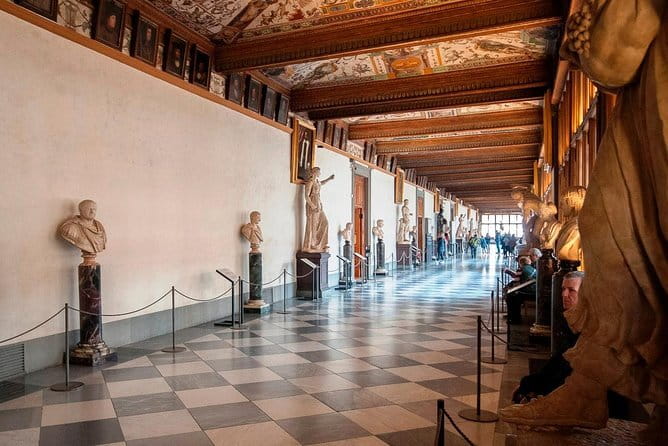
Even with a map, the Uffizi can feel like information overload. So I recommend choosing a target list instead of trying to absorb everything.
Here’s a solid way to use the app effectively:
- Pick 3 anchor artists or works you care about most.
- Spend extra time on those works, and use the audio to add the “why it matters” context.
- Let the rest of the rooms be a bonus, not a homework assignment.
The audio approach is helpful because it puts art history into manageable chunks. The app aims to explain the background behind famous works, and you’ll get a high-level overview rather than a lecture. If you’re the type who wants to argue brushstrokes with someone afterward, you may prefer a separate guided tour at a higher cost—but if you just want meaning and direction without a group, this style works.
Also, don’t assume you’ll enjoy every room equally. The Uffizi’s power comes from contrast: you’ll go from famous myth and portraiture to works that show shifting styles and techniques. Having audio can make those transitions feel clearer rather than random.
Stop 2 Optional: Accademia for Michelangelo’s Main Hits

If you select the Accademia option, you’ll add a second museum visit for about an hour. The focus stays on Michelangelo’s art, including well-known works such as I Prigioni, San Matteo, and the Palestrina Pietà.
I like pairing Uffizi with Accademia because the day has a theme. You start with painting and Renaissance masters, then you shift into sculpture and the physicality of Michelangelo’s forms. It gives your Florence trip a nice through-line, especially if Michelangelo is your priority.
The drawback is time. Two museums in one day is doable, but it compresses your pace. If you’re someone who likes to linger, you might feel rushed during the switch. If you’re selecting Accademia, go in with a plan: know what you want to see, and don’t expect to “fully do” every room in both places.






Price and Value Check: When $58.88 Makes Sense

The listed price is $58.88 per person, and the ticket itself for the Uffizi is tied to a standard surcharge. What you’re really paying for is convenience: you get the admission ticket included, the smartphone app guide, and multilingual telephone assistance, plus that timed entry approach.
That can be excellent value if:
- You want to avoid the stress of ticket lines.
- You prefer solo exploring rather than following a guide.
- You’re okay using your own phone for information.
It can feel less worth it if:
- You planned to rely on audio but don’t have the time to troubleshoot your phone.
- You hate technology dependence while walking through big museums.
- You want a deeper art-history explanation on the spot.
If you add Accademia, the package typically includes reservation/guaranteed entry time for that museum. That’s a meaningful advantage in Florence, where popular timed entries can be competitive. In other words: you’re paying to reduce friction, not just to buy admission.
The Logistics That Decide Success or Headaches

This is the part that matters most.
Bring the right gear
You need your own smartphone and headphones to listen to the app audio. On-site headsets are not provided. I’d treat this as non-negotiable. If you forget, you’ll still see paintings, but you’ll lose a major part of what you paid for.
Download before you go
The app guide needs to be downloaded in advance for the best experience. Some people have reported trouble when the gallery had limited connectivity or when their app content didn’t download properly ahead of time. One lesson that keeps showing up: don’t trust museum Wi‑Fi, and don’t wait until you’re inside to set everything up.
Signal can be a factor
Even when downloads are done, app performance can depend on phone connectivity. In practice, having strong mobile data helps. If your plan is shaky signal-wise, download everything before you enter and keep expectations realistic.
QR codes and meeting points can be confusing
There have been cases where QR codes didn’t work or where the meeting staff wasn’t obvious to find quickly. Your best defense is to:
- arrive early enough to locate the meeting point calmly
- have your voucher details handy
- keep your phone charged
Maps can be imperfect
The 3D map is meant to get you to the masterworks fast, but one issue that’s possible: positioning info in the app may not match changes happening inside the museum. If the map seems off, don’t panic. Use it as a directional tool, then switch to visual scanning of the rooms you’re already in.
Who This Works Best For (and Who Should Skip It)

This option is ideal for:
- independent visitors who want control over pace
- people on a budget who still want context
- art lovers who don’t need a live lecturer to enjoy great works
- anyone doing both Uffizi and Accademia without booking a full guided package
You might prefer a different format if:
- you strongly want a human guide to explain and answer questions
- you’re traveling with a device that’s unreliable or low storage
- you dislike technology setups in busy places
- you need offline audio with zero dependence on data at all costs (since your setup still has to work before entry)
Should You Book This Uffizi Self-Guided Plan?
I’d book it when you want a smart, time-saving entry approach and you’re comfortable using a smartphone guide. The combo of timed entry, audio context, and the 3D map can turn a crowded museum into a more manageable experience.
I’d skip it if you know your phone setup is fragile—low battery, spotty ability to download apps, or no headphones. In that case, you might spend more energy troubleshooting than enjoying the art.
If you do book, set yourself up for success: download the app before you arrive, charge your phone, and bring headphones. Then use the audio to build meaning around a few anchor works, and let the rest of the Uffizi be a bonus.
FAQ
How long does the Uffizi visit take?
The total time is about 2 to 3 hours.
What if I choose the Accademia option?
Accademia is an optional add-on and is about 1 hour, with guaranteed entry time included if selected.
Do I get an in-person guided tour?
No. This is self-guided. An in-person guided tour is not included.
Do I need headphones?
Yes. To listen to the audio app contents, you need your own smartphone and headphones.
Is the entry time flexible?
No. The Uffizi ticket has a fixed entry time that cannot be changed after booking.
What happens if I arrive late to the check-in time?
It’s mandatory to arrive at the meeting point at the stated check-in time. If you’re late, you may not be able to get the time-entry ticket, access the museum, and you won’t receive a refund or reschedule.
What identification do I need?
You must present an original valid passport or ID document that matches the name provided at booking.
If you want, tell me your travel month and whether you’re adding Accademia, and I’ll suggest a practical route strategy for what to prioritize first at each museum.