REVIEW · VENICE
Venezia Audioguide – TravelMate app for your smartphone
Book on GetYourGuide →Operated by MyWoWo Srl · Bookable on GetYourGuide
Venice makes sense with a good audio map. This TravelMate app turns your smartphone into a self-guided audioguide, with professionally made tracks that you can play anywhere in the city—no meeting point, no paper ticket, just press play.
I love that it’s ready for both offline listening and online use, so you’re not stuck waiting for signal. I also like that you can replay sections and read the text of the audio files right in the app. One drawback: some numeric details can feel shaky, such as a reported claim about step counts at St. Mark’s tower—so I’d treat exact numbers with extra caution.
In This Review
- Key points to know before you press play
- Why a smartphone audioguide feels right in Venice
- Price and value: getting 85 stops for $6
- Getting started: download TravelMate and find your activation code
- How to use the audio guide day-to-day (offline, text, earphones)
- What the app covers: Venice introduction + a smart mix of sights
- St. Mark’s to the Doge’s Palace: the power center story
- Grand Canal and Rialto: your canal-view compass
- Art stops that work whether you love museums or not
- Biennale, La Fenice, and the stage side of Venice
- Neighborhood culture: churches, schools, and local identity
- The Ghetto and Scuole: a more human kind of history
- Arsenal and Murano: Venice beyond the postcard frame
- Local cuisine audio: using it as a way to choose what to eat
- Quizzes and replay: learning you can repeat without extra cost
- Accuracy check: when numbers don’t pass the smell test
- Who should book this app (and who might not love it)
- Should you book TravelMate’s Venezia audioguide app?
- FAQ
- How much does the Venezia audioguide cost?
- Do I need a meeting point or paper tickets?
- How long is the audioguide valid after activation?
- Can I listen offline in Venice?
- What languages are included?
- Where can I find my activation code?
- Is it wheelchair accessible?
Key points to know before you press play

- 85 audio stops for about 255 minutes of content, so you can do a short loop or build a full day
- Offline or online listening means fewer headaches when the signal drops
- No paper tickets or scheduled meeting point—you start wherever you want
- Replay anytime with validity lasting 1095.5 days from first activation
- Text + audio lets you switch between listening and reading
- Quiz section gives quick practice with short questions about Venice
Why a smartphone audioguide feels right in Venice

Venice is one of those places where your day changes based on where you turn next. That’s exactly why an app-style guide works so well: you’re not locked into a group pace or a fixed route.
TravelMate is built for autonomy. You download, activate, and start your walk straight away. In practice, that means you can do a quick, high-impact “greatest hits” stroll around St. Mark’s and Rialto, or you can wander toward art museums, churches, and neighborhood landmarks at your own speed.
Another practical win: you’re using your own phone and (ideally) your own earphones. No sharing headsets, no grabbing devices from a third party, and no worrying about who used what before you.
You can also read our reviews of more tours and experiences in Venice.



Price and value: getting 85 stops for $6

At $6 per person, this is one of the lowest-cost ways to get structured guidance around Venice. The value comes from two things that matter in real life: time and reusability.
You get 85 audio items totaling 255 minutes. That’s enough to give meaningful context for major sights without forcing you to listen nonstop. You can also replay any track as many times as you want, and nothing “expires” once you’ve activated it—your access runs for 1095.5 days from first activation (basically about three years).
If you’re the type who likes to go back to a place and re-learn it later, this format is especially good. You can use it on one trip, then re-use the same app for a second visit without buying another guide.
Also, the app isn’t just audio. You can read the text of the audio files, which helps when you want to confirm a detail on the spot without rewinding for five minutes.
Getting started: download TravelMate and find your activation code
There’s no meeting point. The whole plan is: download the app, activate it, and start right away from wherever you are.
Here’s what you need:
- Android: download the app called TRAVELMATE from the Play Store
- iOS: download the app called TRAVELMATE TM from the App Store
- Activation code: it’s a 10-digit number you’ll find in your email or in the GetYourGuide app
In the email, look for the activity details or a tickets view. Then:
- open the barcode area (inside the orange frame)
- locate the 10-digit activation code shown just under the black-and-white barcode
If you use GetYourGuide:
- open the ticket in the GetYourGuide app
- tap the barcode image area (orange frame)
- copy the 10-digit code shown underneath
That’s it. No pickup desk. No waiting for a guide to arrive.
How to use the audio guide day-to-day (offline, text, earphones)

This guide works in a simple loop: you walk to a stop, press play, and let the story roll. You can listen online or offline. If you’re trying to avoid battery stress, plan to download or switch to offline mode as you go (the app supports both).
Earphones are recommended. In Venice, that’s not just comfort—it also helps you hear the audio clearly while the streets do their usual background-noise thing.
A small but useful feature: you can read the text of each audio track. That’s great for two situations:
- when you’re pausing and want to scan quickly
- when you’re standing still enough to read for a minute without slowing others down
One more smart option is the quiz section. It’s not a replacement for actual exploration, but it does turn your sightseeing into short learning bursts. If you’re traveling solo or with a family that likes games, that quiz section is an easy way to keep attention from drifting.
What the app covers: Venice introduction + a smart mix of sights

The audio library is organized around key moments and locations, including:
- Venice introduction
- Wonders of local cuisine
- Accademia Gallery
- Arsenal
- Basilica of the Friars
- Biennale
- Cà D’Oro
- Cà Rezzonico
- Correr Museum
- Doge’s Palace
- Grand Canal
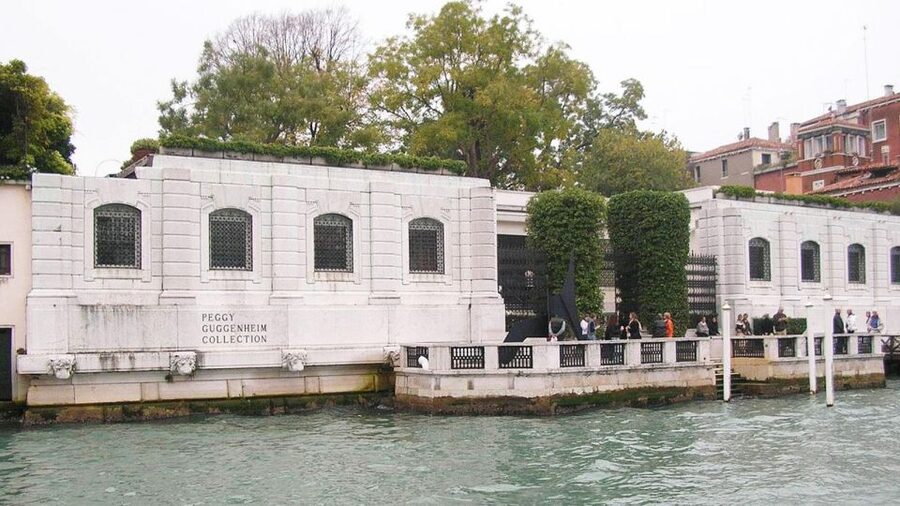
- Guggenheim
- La Fenice Theater
- Marciana Library
- Murano
- Rialto Bridge
- San Sebastiano
- San Zanipolo
- Scuola Di S. Giorgio Degli Schiavoni
- Scuola Grande Di San Rocco
- St. Mark’s
- The Ghetto
You can treat these as a menu. Pick a few stops for a half-day, or chain several together into a full day. Since the guide totals 255 minutes across 85 tracks, you don’t have to commit to long listening blocks—most items are designed to be digested while you’re walking and looking.






St. Mark’s to the Doge’s Palace: the power center story

If you want the easiest start, anchor your day around the landmarks that feel like Venice’s political and cultural center. The app includes St. Mark’s, the Doge’s Palace, and the Marciana Library—a strong trio for understanding how the city’s identity formed.
What makes this cluster useful is that it gives you a framework. You’ll get context for what you’re looking at, not just a list of features. And because Venice’s big sites can feel overwhelming when you’re seeing them all at once, having guided audio keeps your brain from turning into fog.
A practical approach: listen to a short orientation track early, then use the Doge’s Palace and library sections as you move through the area. That way, the story you hear matches what you can see, and you’re not trying to remember details later.
Grand Canal and Rialto: your canal-view compass

Venice’s main “moving line” is the waterway, and the guide leans into that with Grand Canal and Rialto Bridge.
I like having audio content tied to these places because they help you notice patterns. Instead of just thinking: bridge… canal… boats… you get prompts that make you look longer. Even when you’re only stopping for photos, you’ll feel like you’re seeing the city’s structure, not just scenery.
A key tip for using this part well: don’t force yourself to listen while you’re walking at full speed. Stop briefly, press play, and let the audio guide your attention. If you try to play everything while you’re rushing, the guide becomes noise.
Art stops that work whether you love museums or not

The app includes a nice spread across art styles and eras: Accademia Gallery, Cà D’Oro, Cà Rezzonico, Correr Museum, and Guggenheim.
Here’s why that mix matters: Venice is not only museums in one district. You’ll see “Venice art” in palaces, in museum collections, and in landmark buildings tied to the city’s long cultural life. By giving you multiple art venues, the guide lets you choose what fits your day.
Even if you’re not a museum diehard, these tracks can still make a difference. They help you understand what to focus on when you step inside a place: what kind of story the building is telling, and how it connects to Venice beyond the photo.
If you do plan to visit more than one art site, consider this pacing rule: listen to fewer tracks per location and then replay one favorite track later. That’s often better than trying to absorb everything at once.
Biennale, La Fenice, and the stage side of Venice

Venice isn’t only marble and palaces. The app includes Biennale and La Fenice Theater, which shifts the tone toward the city’s live arts and contemporary cultural energy.
I like this section because it prevents your trip from turning into a straight line of old-world sights. Even on days when you don’t catch an event, you can use the audio to understand why these institutions matter and what role they play in Venice’s identity.
You’ll also get more variety in what you’re paying attention to. Instead of focusing only on architecture, you’re prompted to think about performance, public life, and how modern culture fits into old streets.
Neighborhood culture: churches, schools, and local identity
The guide takes you beyond the most obvious checkpoints with stops such as Basilica of the Friars, San Sebastiano, and San Zanipolo. It also includes the Scuola Di S. Giorgio Degli Schiavoni and Scuola Grande Di San Rocco, which add depth to the story of community life.
This matters because Venice’s standout features are often tied to neighborhood identity, not only the grand showpieces. These places help you understand that the city’s culture wasn’t built solely by courts and churches—it was also shaped by community organizations and local traditions.
If you’re choosing what to listen to, I suggest this simple method:
- pick one “major” sight for your morning
- pick one neighborhood site for your afternoon
- save one longer listening track for evening when you’re walking more slowly
It keeps your day balanced and prevents fatigue.
The Ghetto and Scuole: a more human kind of history
The app includes The Ghetto, plus the schools associated with Scuola Di S. Giorgio Degli Schiavoni and Scuola Grande Di San Rocco. Even without turning your walk into a full lecture, these stops can help you connect Venice’s cultural life to real communities.
I find this section especially valuable because it doesn’t feel like generic sightseeing. You’re listening for context: why this space exists, how it fits into the broader city, and what you should pay attention to as you look around.
If you like learning through atmosphere rather than just facts, this part is a good match. Pause, listen, then keep walking. Let the audio be a guide to what your eyes notice next.
Arsenal and Murano: Venice beyond the postcard frame
Two stops widen the picture: Arsenal and Murano.
- Arsenal adds a practical, historic angle. It helps explain a side of Venice tied to industry and civic power, not just tourism-facing beauty.
- Murano gives you the island story. It’s one of the best ways to feel that Venice has outer layers, not only the lagoon city blocks.
If you’re short on time, you might not fit everything. That’s fine. The guide’s structure makes it easy to pick one “expand” choice for a day: either stay focused on Venice’s main districts, or take a detour toward Murano-style perspective.
Local cuisine audio: using it as a way to choose what to eat
One track category is Wonders of local cuisine. I see this as more than entertainment. It helps you think before you order.
Venice food can be confusing if you only look at menus. With a cuisine audio track in your pocket, you can steer your choices toward what the city is known for, and you’ll understand the logic behind certain dishes and flavors.
A smart way to use this: listen to the cuisine content earlier in the day. Then, when you’re hungry and faced with 10 menu options, you’ll already have a sense of what to look for.
Quizzes and replay: learning you can repeat without extra cost
A quiz section is built into the app, with short questions that help you learn while you go. It’s a small feature, but it’s the kind that turns passive listening into active memory.
Then there’s the big advantage: you can replay the audio as many times as you like. That means your guide doesn’t disappear after one trip. If you want to re-listen to your favorite stop—maybe Doge’s Palace or Guggenheim—you can do that on another day without paying again.
Also, the guide is available in multiple languages: Chinese, English, French, German, Italian, Russian, Spanish. That’s especially useful if you’re traveling with someone who doesn’t want to switch phones or rely on translation.
Accuracy check: when numbers don’t pass the smell test
Audio guides are storytellers. That’s the point. Still, when a guide uses precise numbers, you want to trust it.
One specific example has been flagged as questionable: the audio reportedly says you have to climb 36 steps to reach the tower of St. Mark’s Basilica. I’d use that as a reminder: if you’re planning around exact step counts or other hard-to-verify details, double-check on site with your own eyes.
The bigger picture: the guide is useful for orientation and context, even when you treat a few numeric claims as the kind of detail that might need verification.
Who should book this app (and who might not love it)
This TravelMate Venezia audioguide app is best for you if:
- you like setting your own pace
- you want offline flexibility
- you’re fine using an app interface while you walk
- you want a low-cost guide you can reuse later
It might feel less satisfying if:
- you need 100 percent fact-proof precision on every detail
- you want a live human guide answering questions in real time
- you prefer a full structured route with set timing and stops
In short: it’s a strong choice for independent sightseeing with good structure, not a replacement for expert on-the-ground guidance.
Should you book TravelMate’s Venezia audioguide app?
Yes—if your goal is to get organized quickly and add context to what you’re already seeing. For about $6, you’re buying a long-lived audio library (85 items, 255 minutes total, available for 1095.5 days) that works offline and supports multiple languages. The convenience of no meeting point and no paper ticket also makes it easy to start right away, which matters in Venice.
But go in with the right mindset: treat it as a smart companion for orientation and storytelling. For exact numbers, especially step counts or other planning-sensitive details, do a quick check on site.
If you want independent Venice guidance with minimal friction, this is a good value pick.
FAQ
How much does the Venezia audioguide cost?
It costs $6 per person.
Do I need a meeting point or paper tickets?
No. There is no meeting point, and you download the TravelMate app to start your experience right away. No paper ticket collection is required.
How long is the audioguide valid after activation?
It’s valid for 1095.5 days from your first activation.
Can I listen offline in Venice?
Yes. You can listen to the audio guide online or offline.
What languages are included?
The audio content is available in Chinese, English, French, German, Italian, Russian, and Spanish.
Where can I find my activation code?
You can find the 10-digit activation code in the email (under the barcode in the orange frame) or in the GetYourGuide app by opening the ticket and viewing the barcode.
Is it wheelchair accessible?
Yes, the activity is listed as wheelchair accessible.