REVIEW · AUSTIN
An Exciting Scavenger Hunt: Austin Capitol Sights & Downtown Gems
Book on Viator →Operated by Let's Roam · Bookable on Viator
Austin’s Capitol area is a perfect place to play detective. This app-led hunt turns a simple walk into a clue-chasing afternoon, hitting major downtown sights like the Texas Capitol, Paramount Theatre, and Saint Mary Cathedral. I like that it’s self-guided in your group only, so you can start whenever you want and move at your own pace. I also like the interactive roles and photo challenges, where each person gets texted tasks and points for the best shots. One thing to consider: you’re paying for an app experience, and the more you expect a guided explanation, the more the app-based format may feel frustrating.
You’ll meet at 1100 Congress Ave and finish back there, usually in about 1.5 to 2 hours. The hunt is built for finding answers in person on plaques, statues, art, and other sights, so it rewards slow looking and good phone battery. If your smartphone dies early or you hate app navigation, plan ahead—this experience basically runs on your device.
In This Review
- Key Things to Know Before You Go
- How This App-Led Austin Capitol Scavenger Hunt Works (No Tour Guide Required)
- Price and Time: Is $14.99 for 1.5–2 Hours Good Value?
- Start at 1100 Congress Ave: Route Flow and Pacing Tips
- Stop-by-Stop: From Millett Opera House to the Wooldridge Square Start
- Millett Opera House and Wooldridge Square (Stops 1–2)
- Texas Governor’s Mansion (Stop 3)
- Austin History Center to Paramount Theatre: Clues in the Built Environment
- Austin History Center and Paramount Theatre (Stops 4–5)
- Moonlight Towers to Bremond Block: When Photo Challenges Take Over
- Moonlight Towers and Bremond Block (Stops 6–7)
- Austin Central Library to Old Bakery & Emporium: Quick Stops, Smart Looking
- Austin Central Library (Austin Public Library) and Old Bakery & Emporium (Stops 8–9)
- Texas Capitol and Capitol Complex Visitors Center: The Big Climax
- Texas Capitol (Stop 10) and Capitol Complex Visitors Center (Stop 11)
- The Contemporary Austin at Jones Center and Saint Mary Cathedral: Finish Strong
- The Contemporary Austin – Jones Center (Stop 12) and Saint Mary Cathedral (Stop 13)
- Photo Challenges: How to Get Better Results and Use Less Battery
- Who This Scavenger Hunt Suits Best (And Who Should Skip)
- Should You Book Austin Capitol Sights & Downtown Gems?
- FAQ
- How long is the Austin Capitol Sights & Downtown Gems scavenger hunt?
- Where do I start, and where do I end?
- Can I start at any time?
- What do I need to bring?
- What’s included in the price?
- What is the cancellation policy?
Key Things to Know Before You Go

- Start anytime, self-guided: you don’t need a tour guide or a fixed check-in time.
- Let’s Roam app does the directing: download, register, redeem, then follow the prompts on your phone.
- Each person has a different role: challenges vary by person, not just one shared task.
- Photo challenges add momentum: you’ll get texted photo prompts and earn points for strong entries.
- Capitol to downtown in one flow: the route links major stops without you planning the sightseeing order.
- You need a charged phone: bring a power bank if you expect heavy photo use.
How This App-Led Austin Capitol Scavenger Hunt Works (No Tour Guide Required)

This is a classic scavenger-hunt format, but it’s wrapped in the Let’s Roam app. After you buy the ticket, you download the app, register, and redeem your ticket inside it. From there, the app guides you through the experience and delivers the kinds of challenges you can only do by looking at what’s in front of you.
The big difference versus a traditional walking tour: there’s no guide talking at you. Instead, each player has an interactive role, and the challenges are designed to vary by person. Practically, that means your group won’t all be stuck doing the same thing at the same time. It’s built to keep a group moving, splitting up briefly for tasks, then re-grouping to compare answers and photo attempts.
Also, the hunt is designed around in-person details. You’re looking for trivia-style answers that are hidden on things like plaques, statues, and art. That’s fun if you like noticing small details. If you prefer big-picture explanations and quick context, you’ll have to supply that yourself with quick reading at each stop (or you’ll just miss half the point).
You can also read our reviews of more tours and experiences in Austin.

Price and Time: Is $14.99 for 1.5–2 Hours Good Value?
At $14.99 per person for about 1.5 to 2 hours, you’re paying for the convenience of a pre-built route plus interactive challenges delivered on your phone. What you’re not paying for is a human guide, entrance tickets, food, or transportation.
So the value depends on what you’re buying:
- If you enjoy scavenger hunts, like answering questions on-site, and want structure without a fixed tour schedule, the price can feel fair.
- If you were hoping for guided interpretation of Austin’s landmarks, you might feel like you’re paying for an app instead of learning from a person.
There’s also a practical “cost” to budget for: your time and attention. If your group is easily distracted, gets lost, or constantly stops to troubleshoot the app, the experience can stretch and feel less worth it.
One more factor: it’s a mobile format with a mobile ticket, so you should treat this like a tech-dependent activity. A dead phone battery effectively becomes a dropped task—then you’re hunting for clues without the mechanism that gives you direction.
Start at 1100 Congress Ave: Route Flow and Pacing Tips
Your meeting point is 1100 Congress Ave, Austin, TX 78701, and the activity ends back at the same place. That matters because you don’t have to figure out a one-way route or a return plan.
The hunt hits 13 stops in total. Since the duration is usually 1.5–2 hours, you’ll want a pace that’s brisk but not frantic. In practice, that means:
- Spend enough time to look at the plaques/statues/art the app asks about.
- Keep photos efficient. Don’t treat every shot like it’s a full production.
- When the app tells you a challenge is coming up, do it right away. Waiting makes the next clue harder to find.
Comfortable shoes help because you’re moving through downtown and the Capitol complex area. The experience lists a moderate physical fitness level, which I take to mean: you can do a decent walking route without needing to be an athlete, but you should not plan to do it in flip-flops or with zero willingness to walk.
Stop-by-Stop: From Millett Opera House to the Wooldridge Square Start
Millett Opera House and Wooldridge Square (Stops 1–2)
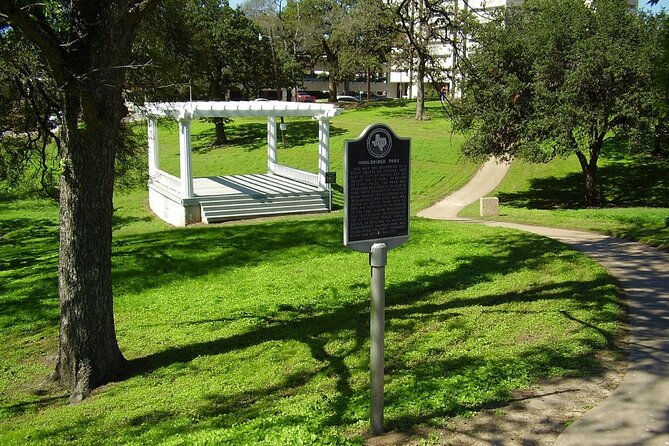
You begin with Millett Opera House and then head to Wooldridge Square. Early on, the scavenger hunt setup phase is where groups either click or struggle. Give yourselves 5–10 minutes to get comfortable with the app flow: opening the prompts, reading the on-screen directions, and understanding what type of clues you’re supposed to look for.
This stretch is also a good place for your group to get into a scavenger mindset. You’ll be hunting for answers that are present in the environment, not in a classroom or lecture. If your group likes walking and noticing details, you’ll probably start earning points quickly (especially if one person is focused on finding the clue and another is focused on photo prompts).
Texas Governor’s Mansion (Stop 3)
Next is the Texas Governor’s Mansion. For scavenger hunts, “signal points” like this are helpful. They tend to be recognizable, photo-friendly, and good places to pause while the app pushes you toward a question tied to what you can see nearby.
The drawback here is timing. If you linger too long at one landmark early in the hunt, you’ll feel rushed later around the Capitol area, where there can be more foot traffic and more people stopping for photos.
Austin History Center to Paramount Theatre: Clues in the Built Environment
Austin History Center and Paramount Theatre (Stops 4–5)
You’ll then move to Austin History Center and Paramount Theatre. These stops fit the scavenger-hunt concept: you’re in places where signage, decorative elements, and exterior details are exactly the sort of location where the app’s questions tend to come from.
This is a good section for groups who like to split roles. One person can focus on finding the answer, while someone else can get ahead by scouting a photo angle for the next activity prompt. Since challenges vary by person, you can also coordinate so nobody is waiting around.
One practical tip: keep an eye on your phone’s brightness and power use. This route includes a lot of camera moments, and the app relies on you staying oriented on the screen.
Moonlight Towers to Bremond Block: When Photo Challenges Take Over
Moonlight Towers and Bremond Block (Stops 6–7)
Next up are Moonlight Towers and then Bremond Block. This portion of the route is ideal for photo-friendly play. When the app sends you texted photo challenges, it’s not just about taking a picture—it’s about using the right viewpoint fast.
If you want better results (and a better chance of scoring points), try a simple routine:
- Take one wide shot to capture the landmark context.
- Take one tighter shot that emphasizes a detail you think the app might care about.
- Only then spend time experimenting.
Bremond Block is the kind of spot where you can burn 20 minutes without noticing it, especially if you love strolling. I’d treat it as a “look, solve, shoot, move” moment so you don’t run out of energy before the Capitol finale.
Austin Central Library to Old Bakery & Emporium: Quick Stops, Smart Looking

Austin Central Library (Austin Public Library) and Old Bakery & Emporium (Stops 8–9)
You’ll pass Austin Central Library (Austin Public Library) and then stop at Old Bakery & Emporium. These are strong “clue hunt” locations because they encourage you to slow down and look for the small printed or sculpted details that scavenger hunts love.
This is also a good place to make sure your team is synced on progress. Since the roles and challenges vary, you’ll want to avoid the classic group problem: two people assume someone else already got the answer. A quick check-in every stop saves time.
Also consider weather. This part of the route is easy to turn into a stop-and-start walking rhythm—great when it’s pleasant outside, annoying if it’s hot or raining. Bring water if you’re sensitive to heat, even though food and beverages aren’t included.
Texas Capitol and Capitol Complex Visitors Center: The Big Climax
Texas Capitol (Stop 10) and Capitol Complex Visitors Center (Stop 11)
Then you hit the headline act: Texas Capitol followed by the Capitol Complex Visitors Center. If you’re doing this hunt for the sightseeing payoff, this is where it lands.
At the Capitol, the scavenger hunt logic tends to feel more rewarding because you’re in a place people recognize instantly. You’re not just looking for an answer—you’re doing it with a sense of place. The app questions here likely push you to notice details around the complex, and the visitors center can function as a natural pause point while your group regroups.
Drawback: this is also the area where crowds and foot traffic can interfere with your photo challenges. It doesn’t ruin the hunt, but it can slow you down. If you want cleaner shots and more breathing room, choose a start time that matches your comfort with crowds (the hunt lets you start any time).
The Contemporary Austin at Jones Center and Saint Mary Cathedral: Finish Strong
The Contemporary Austin – Jones Center (Stop 12) and Saint Mary Cathedral (Stop 13)
Your last stretch includes The Contemporary Austin – Jones Center and then Saint Mary Cathedral to close out the loop. This closing portion works well because it shifts the experience from civic monument mode to arts-and-community atmosphere.
For your group, this is the “wrap and score” section. If you’ve been taking photos for points, you’ll be finishing the best attempts here. If your device battery is low, you’ll also notice you’re near the end—so treat this as the place to make your last photos count.
The scavenger hunt ends back at the meeting point, so you’re not stuck wondering where your route finishes. Still, you’ll want to keep walking. Don’t rush through the final stops so much that you miss the final clue set.
Photo Challenges: How to Get Better Results and Use Less Battery
Photo challenges are a fun part of this hunt, and they’re also where people burn phone power. Here’s how to keep it practical:
- Keep your camera ready. Don’t switch back and forth between app screens and camera apps constantly.
- Take 2–3 photos per prompt, not 20. If you need to choose later, do it quickly.
- If the app asks for something tied to a detail, try both wide and close framing.
- If you can, wipe your lens. Downtown reflections and night glare can mess with quick shots.
Most importantly: your phone is both your map and your game controller. Make sure your smartphone is fully charged, and bring a power bank if you think you’ll be taking photos for real.
Who This Scavenger Hunt Suits Best (And Who Should Skip)
This kind of hunt is best for you if:
- you like self-directed sightseeing and don’t want to wait for a group schedule
- your group enjoys interactive challenges, especially roles that change what each person does
- you’re okay using an app as your main guide
It may not be for you if:
- you expect an expert guide to explain the story behind each landmark
- you strongly dislike app navigation or tech-dependent activities
- you mainly want classic museum-level learning rather than on-site scavenger questions
There’s also a fair warning from the reality of the format: some people feel the trivia is too easy or feels similar to stuff they could find online. If you’re that kind of traveler, the fun might depend on whether you enjoy the hunt process itself—walking, searching, and solving—more than the facts.
Should You Book Austin Capitol Sights & Downtown Gems?
I’d book this if you want an organized way to explore Austin’s downtown-and-Capitol corridor without committing to a live guide. It’s good value when you genuinely like scavenger hunts, when your group can stay engaged, and when someone in the team is comfortable running the app.
Skip it if you want hands-on storytelling, you’re likely to get frustrated with tech, or you’re planning a low-battery phone strategy. Also, if you hate photo tasks, know that photo challenges are part of the experience.
If you go in with the right mindset—slow looking, quick solving, charged phone—you’ll likely have a fun, structured walk through some of Austin’s most recognizable landmarks.
FAQ
How long is the Austin Capitol Sights & Downtown Gems scavenger hunt?
The duration is about 2 hours on average, with hunts described as lasting roughly 1.5 to 2 hours.
Where do I start, and where do I end?
You start at 1100 Congress Ave., Austin, TX 78701 and the activity ends back at the same meeting point.
Can I start at any time?
Yes. You can start at any time you wish, and it’s self-guided rather than a fixed tour time with a guide.
What do I need to bring?
You’ll use your smartphone for navigation and interaction with the app, so make sure it’s fully charged. A power bank is recommended if you need one.
What’s included in the price?
The listed inclusion is Let’s Roam App Access.
What is the cancellation policy?
You can cancel for a full refund up to 24 hours in advance. If you cancel within 24 hours of the start time, the amount paid is not refunded.