REVIEW · MOAB
Utah Mighty 5 National Parks Self-Guided Driving Audio Tours
Book on Viator →Operated by Guide With Action · Bookable on Viator
One app, five parks, and the audio cues keep you moving. Utah’s Mighty Five National Parks Self-Guided Driving Audio Tours turns a long road trip into a guided-feeling day, without the schedule pressure.
I especially love the offline maps and how the stories play based on where you are, so you can keep driving and still learn. I also like the per-group pricing (up to 4), which makes the trip feel a lot less expensive than most guided options.
One thing to consider: the experience depends on your phone setup and the download. If your audio doesn’t trigger right from the starting point, you’ll want to troubleshoot before you lose momentum.
In This Review
- Key things to know before you go
- How the Mighty Five audio tour actually guides you
- Price and time: does this really make sense?
- Zion National Park: choosing your Springdale to East Entrance direction
- Arches National Park: the 50+ mile GPS route and the Delicate Arch focus
- Canyonlands National Park: Island in the Sky views plus a Needles option
- Bryce Canyon: viewpoint hopping with story-based timing
- Capitol Reef: history stops plus the Fruita-area vibe
- Best parts of this tour: what you’ll likely feel in the moment
- When things can go sideways (and how to prevent it)
- Should you book the Utah Mighty Five audio tour?
- FAQ
- Which national parks are included in the Utah Mighty Five audio tour?
- How do the audio stories know when to play?
- Do I need cellular service or Wi-Fi during the parks?
- How much does it cost?
- What’s the total time needed for the full Mighty Five experience?
- Do I need to buy park passes?
- Can I use the tour on future trips?
- How do I play the audio in my car?
- What if the audio doesn’t trigger or I can’t access the tour in the app?
- Can I get a full refund if I cancel?
Key things to know before you go

- GPS-triggered hands-free audio: stories play when you approach the next spot.
- Offline access: download while you have strong wifi/cellular, then you can go signal-free.
- One purchase, lifetime access: no expiry, so you can reuse it on future Utah trips.
- Zion has route options: you can do the Springdale Visitor Center to East Entrance direction or reverse it.
- Arches includes a long self-drive loop: each park’s driving route is 50+ miles and usually takes 2–3 hours.
- You can run it from your car speakers: Bluetooth, USB, or AUX support (headphones help for walking portions).
How the Mighty Five audio tour actually guides you
This is a self-guided driving tour, built around a smartphone app by Action’s Tour Guide App. After you book, you get an email and text with setup instructions and a password. The key step is that you need to download the tour while you have strong wifi/cellular. After that, the app works without cell service.
Once you’re onsite, there’s no guide waiting at a meeting point. You simply open the app, launch the correct tour version, and go to the first story’s location. From there, the audio plays automatically as you move along the route. The app is designed to be hands-free in the car, with location-based cues meant to keep your timing aligned with the route.
You also control the pace. You can pause whenever you want, take breaks for photos, or skip stops that don’t interest you. That flexibility matters in the Mighty Five parks, where crowds, parking, and weather can change your day minute by minute.
One practical point: the tour is private for your group, and it’s priced per group (up to 4). In other words, you’re not paying per person just to listen to the same audio.
You can also read our reviews of more tours and experiences in Moab.


Price and time: does this really make sense?

The price is $32.99 per group up to 4, and the total driving day is listed at about 10 to 12 hours. On average, it’s booked about 20 days in advance, which tells me most people are planning around a specific park-hopping schedule.
Value-wise, here’s where it can shine:
- If you’re already doing a Utah road trip, you’re buying one audio system for multiple parks.
- You’re not paying per person, so the cost per listener drops fast once you’re traveling with 2–4 people.
- You get history, geology, and must-see guidance right as you arrive at each spot, so it feels useful instead of like reading later.
If you’re hoping for a fully guided feel with someone managing timing and parking, this isn’t that. It’s self-guided. But the audio is built to reduce the “I’m just driving and guessing” problem that can happen when you visit these parks without a plan.
Zion National Park: choosing your Springdale to East Entrance direction

Zion is often the park where people get their first wow moment, and this tour is set up to help you catch it without missing the best-known stops. You’ll start at either the Springdale Visitor Center and work toward the East Entrance, or you can do the route in reverse for the same kind of experience.
The tour’s Zion route covers classic landmarks and viewpoints, including the Zion Canyon Visitor Center, the Zion Human History Museum, and major canyon stops like Court of the Patriarchs and the Emerald Pools area. From there, you get audio guidance that ties into viewpoints and trail areas such as Angel’s Landing, The Grotto Picnic Area, and Weeping Rock.
A couple of Zion details that make this tour feel efficient:
- You’re led through the canyon drive sequence, so you’re less likely to bounce around randomly.
- You get audio for both the scenic highlights and the historical context, which helps you understand what you’re looking at while you’re still in the moment.
You’ll also pass through the big visual anchor spots like the Zion–Mount Carmel Tunnel, and you’ll reach viewpoints near trail areas including Canyon Overlook Trail and Altar of Sacrifice. The route ends at the East Entrance Ranger Station, so you can flow out of Zion without backtracking.
Possible drawback in Zion: if you jump in late or start from the wrong place, GPS-triggered audio can feel out of sync. So give yourself time to park, get the app going, and begin at the first story point before you start driving deeper.
Arches National Park: the 50+ mile GPS route and the Delicate Arch focus

Arches is the park where people come for one iconic photo—then end up staying longer because everything looks like a sculpted miracle. This tour is designed for that by guiding you through a long driving route.
The Arches portion is described as a 50+ mile-long self-drive that typically takes 2–3 hours. That’s a good match for how Arches feels in real life: you’re not sprinting, but you are moving from one major pullout to the next.
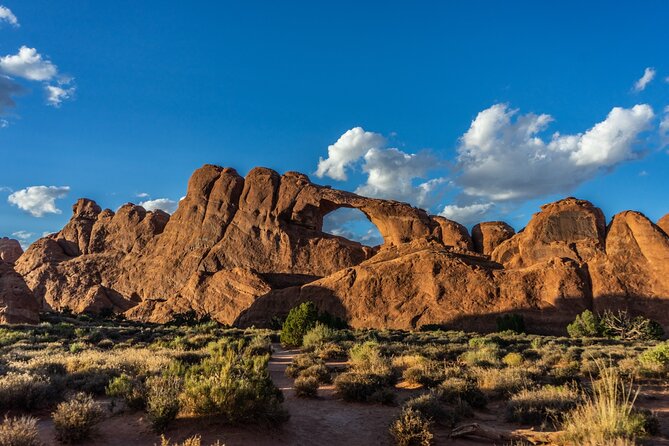
You’ll begin at the Arches Visitor Center, then roll into classic stops and viewpoints such as Three Penguins, Courthouse Towers Viewpoint, and Panorama Point. The audio also ties in the rock formations people look for most, including Double Arch and Delicate Arch.
A few stops I’d pay special attention to while you’re driving:
- Balanced Rock Trail: a quick walk option that adds variety beyond just pulling out for photos.
- Windows Road: a route section that usually makes people slow down because the views stack up.
- Fiery Furnace: even if you’re not planning every possible activity here, the audio helps you frame what you’re seeing.
- Devil’s Garden Trailhead: the start point for another major area of the park.
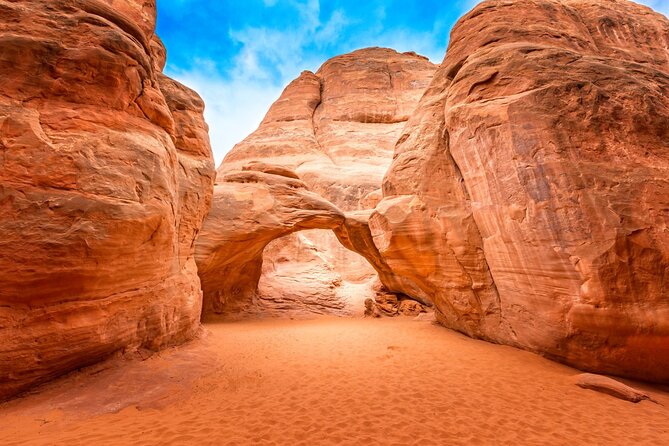
This tour also includes stops like Garden of Eden, Cove of Caves, Salt Valley, Sand Dune Arch, and Petrified Dunes, which is a smart way to keep your Arches visit from feeling like a checklist only.
Practical tip: Arches pulls you into walking spurts. Have water ready and don’t plan your photo time too tightly. The audio will keep you moving, but you still control your stops.
Canyonlands National Park: Island in the Sky views plus a Needles option

Canyonlands is huge, and that scale is exactly why audio guidance helps. The main Canyonlands section described here includes an Island in the Sky-style route with major overlooks and big canyon framing.
You’ll cover viewpoints and features such as Mesa Arch, Shafer Canyon Overlook, and Grand View Point Overlook, plus stops that connect to the park’s dramatic geology like Upheaval Dome and Whale Rock. The route also includes Dead Horse Point State Park, which adds extra scenery without requiring you to rethink your plan.
You’ll hit driving checkpoints like Monitor and Merriamac Rock Formations, Big Mesa Viewpoint, and Plateau Viewpoint, then move along to spots like The Neck, Lathrop Canyon, and Green River Overlook. There are also audio-guided areas tied to multiple parking and pullout points (like Basin Overlook Parking and various overlook trail access points).
Then there’s an extra Canyonlands angle mentioned: a Needles District tour that spotlights places such as Newspaper Rock, Pothole Point, and the Wooden Shoe Overlook.
Here’s the key takeaway for you: Canyonlands can feel like a choose-your-own-adventure park. This audio approach helps because it can guide you through a coherent route instead of leaving you to decide on the fly.
Possible consideration: Canyonlands routes can involve more driving time than you think, and you’re working with scenic pullouts. Give yourself buffer time for parking and walking to the viewpoint edges, especially if you’re traveling with multiple people.


Bryce Canyon: viewpoint hopping with story-based timing
Bryce Canyon rewards slow travel, but it’s also easy to overplan. This audio tour helps you stay oriented while you bounce between viewpoints.
The Bryce portion is aimed at the park’s signature hoodoo scenery, with a route starting around the Bryce Canyon National Park Visitor Center. From there, you’ll get stops that cover common favorites and the wider sweep of views: Sunrise Point, Sunset Point, Inspiration Point, Bryce Amphitheater, and Bryce Point.
You’ll also pass through other viewpoints including Fairyland Point, Paria View, Swamp Canyon Overlook, Farview Point, and Rainbow Point. There are also route stops tied to natural features such as Natural Bridge, plus areas like Agua Canyon and Ponderosa Canyon.
What makes audio here genuinely useful is how it builds a mental picture. When you’re looking at hoodoos and amphitheaters, a short geology or history explanation helps you notice details you might otherwise treat as background.
Also, Bryce has viewpoints close enough together that you can realistically do it as a single driving session without needing a full-on walking day. That’s a big reason this tour format fits well.
Capitol Reef: history stops plus the Fruita-area vibe

Capitol Reef is known for mixing scenic drives with a more human-scale story of settlement and farming, and this tour leans into both.
The Capitol Reef driving loop is listed as about 1 hour, which is notably shorter than Arches or Zion. That doesn’t mean it’s shallow. It means the tour is designed around the parts you can cover quickly while still getting context.
You start at the Capitol Reef National Park Visitor Center, then move through iconic natural features and viewpoints like Twin Rocks, Chimney Rock, and The Fluted Wall. You also get stops tied to distinctive formations such as The Castle and Capitol Reef Formation.
Then the tour shifts into the historic district and Fruita area themes. You’ll see stops such as Fruita Barn, Historic District, and the Mail Tree. The audio also mentions Gifford Homestead, Oyler Mine, and the theme of the Paiute and the Mormons, which helps you understand why this park feels different from the others in the Mighty Five.
There are also trailhead-linked stops and side excursion cues, including Hickman Bridge Trail and areas like Capitol Gorge trailhead and Grand Wash Trailhead. Even if you choose to do only a quick walk at one or two of these, audio guidance makes it easier to pick what fits your energy.
Where Capitol Reef can disappoint (if you’re expecting a full-day hike): it’s structured more like a driving and short stop tour than a long trail marathon. If you want hours of hiking, you may still enjoy it, but plan extra time outside the audio route.
Best parts of this tour: what you’ll likely feel in the moment

The strongest praise for this experience comes from how it makes your park day feel guided without a guide. People love that the audio is GPS-triggered from the car, so it keeps up as you move between stops.
I like that the commentary doesn’t just list places. It adds context, including history and geology, and it tends to include practical info about what you’re looking at and what a stop involves. One big recurring theme in the feedback I used to shape my expectations: the audio can give you what you need right before you see something for real, instead of leaving you to guess.
Also, offline access is a real advantage in Utah. If you’ve ever been stuck trying to load a map or a web page in a canyon, you know why this matters. With this format, you’re not constantly hunting for signal.
Finally, the ability to pause, restart, and skip is a quiet superpower. If you want a bathroom break, a snack stop, or an extra minute watching the sun move across the rocks, you can do it without breaking the plan.
When things can go sideways (and how to prevent it)
The biggest risk is not the parks. It’s the phone.
Here’s what can cause problems based on the issues and limits described:
- You may need to start the tour from the correct beginning point. If you start in the wrong spot, the GPS cues can be off.
- You must download the tour while you have strong wifi/cellular, or offline use won’t work the way you expect.
- Your audio setup matters. If you can’t hear it in your car, the whole point of hands-free guidance disappears.
There’s also a cautionary note from a negative review: the app experience can fail if the audio guide stops appearing in the app. If that happens to you, the right move is to contact support immediately. The help instructions also say to reach out if you face audio issues, and that you can use the product during the validity window.
One more small annoyance mentioned: some people felt pressured by prompts to rate the trip. That’s not the content of the tour, but it can be distracting at the end of your day.
If you want a smooth run, do this checklist before you enter the parks:
- Download the tour over good signal.
- Open the app while you’re onsite and ready to start.
- Start from the first story point.
- Test audio output to your car speakers (Bluetooth/USB/AUX) before you drive.
Should you book the Utah Mighty Five audio tour?
Book it if you:
- Want five parks without paying for five separate guided tours.
- Like the idea of offline, GPS-triggered storytelling so you get context at each stop.
- Are traveling as a group of up to four and want per-group value.
- Prefer to control your pace, pausing for photos, snacks, and side walks.
Think twice if you:
- Need a strict schedule managed for you, like a tour guide would.
- Expect every stop to feel perfectly timed even if you’re entering late or starting from the wrong location.
- Don’t want to manage phone setup, downloading, and audio pairing.
If your goal is an efficient, learn-as-you-go road trip through Zion, Arches, Canyonlands, Bryce, and Capitol Reef, this tour is a strong fit. Just make the download and starting point part of your plan, and you’ll spend more time looking at Utah and less time troubleshooting your phone.
FAQ
Which national parks are included in the Utah Mighty Five audio tour?
The bundle covers Zion National Park, Arches National Park, Canyonlands National Park, Bryce Canyon National Park, and Capitol Reef National Park.
How do the audio stories know when to play?
The audio is location-based and plays automatically as you approach each story point. It’s designed to run hands-free and sync with your route when you start at the correct location.
Do I need cellular service or Wi-Fi during the parks?
You don’t need signal while touring. The app supports offline access, but you must download the tour while you have strong wifi or cellular before you rely on offline mode.
How much does it cost?
It’s priced at $32.99 per group for up to 4 people.
What’s the total time needed for the full Mighty Five experience?
The duration is listed as 10 to 12 hours on average for the full set.
Do I need to buy park passes?
Yes. Park passes are not included.
Can I use the tour on future trips?
Yes. The access is described as new, lifetime access with no expiry, so you can use it anytime on any trip as many times as you want.
How do I play the audio in my car?
The instructions say you can connect your phone to your car using Bluetooth, USB, or AUX. Audio playback is compatible with Apple CarPlay, and Android Auto support is described as on the way.
What if the audio doesn’t trigger or I can’t access the tour in the app?
If you face audio issues, the guidance is to contact support. You can also try starting from the tour’s recommended first story point to keep GPS cues aligned.
Can I get a full refund if I cancel?
Free cancellation is available up to 24 hours in advance for a full refund. If you cancel less than 24 hours before the start time, the amount paid is not refunded.