REVIEW · MONTEREY AND CARMEL
Scenic Path Carmel-by-the-Sea: A Self-Guided Audio Tour
Book on Viator →Operated by VoiceMap Audio Tours · Bookable on Viator
Carmel tells its best stories on foot. This self-guided audio walk follows Carmel-by-the-Sea’s Scenic Road, and I like the GPS tracking that keeps you on the right stretch. I also like how the house histories turn ordinary scenery into names, eras, and context as you stroll. One thing to consider: you’ll need to bring your own smartphone and headphones, and if you jump between the audio and the map screen, you can feel momentarily unsure where you are.
What makes this tour practical is that it’s flexible. You’re not stuck with a group pace, so you can slow down for views, pause for photos, or simply linger when a story makes you look twice at a façade. Plus, the tour includes lifetime access, so you can come back to Carmel later and replay your route without buying again.
The route itself is built around classic coastal walks: boardwalk time, then Ocean Avenue, with stops that take you past standout homes and toward the inn area. Expect around 75 minutes for the main loop, but it can run longer if you stop often.
In This Review
- Key things to know before you go
- Why Carmel’s Scenic Road is ideal for audio stories
- Meeting at Camino Real & 8th Avenue, then getting oriented fast
- Boardwalk walking: first views and first context
- Ocean Avenue: where the narration makes the neighborhood pop
- The house and the inn area: when you feel the route’s design
- Using VoiceMap GPS and offline audio without frustration
- Timing: about 75 minutes, plus room for lingering
- Price and value: $11.99 with lifetime access
- Who should book this self-guided Carmel audio tour
- Should you book Scenic Path Carmel-by-the-Sea?
- FAQ
- How long is the Scenic Path Carmel-by-the-Sea audio tour?
- Where does the tour start and end?
- Is the tour available in English?
- Do I get offline access?
- What do I need to bring?
- Can I get a refund if my plans change?
Key things to know before you go
- GPS guidance that lines up with where you actually are on the route
- Detailed commentary on the houses you pass, not just generic town facts
- Offline audio, maps, and geodata through the VoiceMap app
- Lifetime access in English, so you can repeat it later
- A small upper limit of concurrent users (max 15 travelers), even though it’s self-guided
- A route that uses walk-friendly streets and walkways like the boardwalk and Ocean Avenue
Why Carmel’s Scenic Road is ideal for audio stories
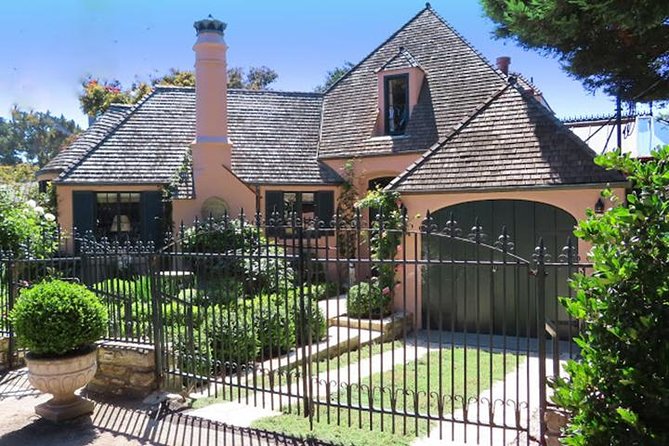
Carmel-by-the-Sea has a way of making you pay attention. The streets curve, the buildings look like they belong in a novel, and the ocean air keeps you moving at a pleasant pace. That’s exactly why this kind of self-guided audio walk works so well here. Instead of reading a plaque, you hear why a place matters while you’re still looking at it.
The best part is that the tour focuses on what you can see from the sidewalk: homes, prominent properties, and the feel of the neighborhood. One of the most praised elements is how accurate the location trigger is, so the audio cues tend to arrive at the right moments. In plain terms, you’re less likely to miss the “listen here” moment and then realize you’ve already walked past it.
There’s also a subtle benefit for your brain: when the audio tells you what to notice, you start spotting details you’d otherwise overlook. You may find yourself looking at architecture or thinking about the kinds of writers, artists, and social figures who lived and spent time in these homes.
You can also read our reviews of more tours and experiences in Monterey and Carmel.



Meeting at Camino Real & 8th Avenue, then getting oriented fast
You start at Camino Real & 8th Avenue (Camino Real & 8th Ave, Carmel-by-the-Sea, CA 93921). The tour ends back at that same meeting point, which matters because it lets you plan your day like a loop, not a one-way trek.
Since it runs every day from 12:00 AM to 11:59 PM, you can fit it into your schedule instead of rushing to match a specific departure time. I’d still pick a practical time of day. If you’re visiting in warmer months, a morning or late afternoon walk often feels better than midday. And if you’re pairing this with other Carmel stops, starting earlier can help you avoid crowd buildup around the busiest stretches.
Before you start walking, take a minute to get set up with the VoiceMap app and confirm the audio and map screens are working. Offline access is included, but the first setup step still matters. Once you’re rolling, the GPS triggers are meant to do the heavy lifting.
Boardwalk walking: first views and first context

One of the route’s earliest payoffs is that it begins with boardwalk walking. Even if you’ve seen coastal boardwalks before, Carmel’s vibe is specific: you get sea views, a steady walking rhythm, and the feeling that you’re moving through a real neighborhood, not a theme park.
This is also where audio tours often succeed or fail. If the first audio is too slow or too abstract, you lose interest early. In this case, the stories about highlighted homes and the surrounding area tend to make the physical environment feel more meaningful as you move along the path.
The boardwalk section is a good warm-up for how the tour works. You’ll learn the pattern: listen for the cues, look up while the narration tells you what you’re seeing, and then continue when it’s done. If you’re the type who loves taking photos, this is a nice place to do it because the scenery supports it.
Drawback to keep in mind: if you pause constantly and keep flipping between the audio track and the map, you can get momentarily disoriented. A simple fix is to commit to one screen at a time until the next audio stop triggers.
Ocean Avenue: where the narration makes the neighborhood pop
After the boardwalk, you’ll shift to Ocean Avenue walking, which is one of Carmel’s iconic corridors. This is where the tour leans hardest into “look, then listen.” The audio doesn’t just name places; it provides history behind the highlighted homes you pass.
This is also where you get the most satisfying “aha” moments. People often assume a self-guided tour means you’ll hear basic facts. Here, you’re encouraged to connect the look of the houses to the stories tied to them. In particular, the tour’s focus on the kinds of writers, artists, and creative social figures linked to these properties can make you feel like the neighborhood has a memory.
If you’re wondering whether this will be repetitive, it usually isn’t—because your eyes keep moving. You’re not sitting in one spot hearing about the same thing. As you walk, each highlighted property gets a separate block of narration, so the experience stays tied to what’s directly in front of you.
Practical note: keep your headphone volume at a level that lets you hear the audio clearly while still staying aware of your surroundings. Ocean Avenue is a walking street, but you’re in a real town, not a sealed walking path.
The house and the inn area: when you feel the route’s design
The tour takes you to a house, then has you walking past an inn and near the inn area again as you continue along the route. This is where the audio tour design starts to feel intentional. Instead of random “spot this building” moments, the narration tends to map to what you’re actually approaching.
I like this kind of structure because it gives your walk a natural storyline: you start by orienting yourself with the coastal path, then you move through the neighborhood’s most recognizable streets, and you eventually circle into the inn area where the town’s “staying here” character becomes part of the story.
One thing to watch: the route is still a walking route, so don’t treat it like a “view it from a distance” experience only. To get the most out of the house and inn narration, you’ll want to slow down at each audio cue and stand where the audio expects you to be. The GPS tracking is praised for being highly accurate, including how precisely cues can line up with directions like look to your right, but it still helps if you’re not walking too fast during transition points.
This part of the walk is also a good time to reset your focus. If you’ve been zooming along with lots of detours or side streets, you might want to regroup on the main path so the audio triggers stay accurate.





Using VoiceMap GPS and offline audio without frustration
This tour runs through the VoiceMap app on Android and iOS, and you get offline access to audio, maps, and geodata. For me, that’s a big quality-of-life feature. Coastal areas can have spotty signal, and you don’t want your tour to depend on cell service.
One of the strongest pieces of feedback is how well the GPS activation works. The narration is timed to your location, and people report no noticeable lag, with stop directions arriving at the right moments. Another reviewer even noted pairing AirPods to an iPhone without trouble, which is a useful clue: modern Bluetooth earbuds generally work fine.
Still, set yourself up to avoid common friction:
- Use your own phone and your own headphones (they aren’t provided)
- Don’t overthink the app’s headphone-style icon on screen. The main point is simple: bring earbuds so the audio can play
- If you use both the map and audio screens, avoid rapid toggling until the next stop begins
If you’re the type who hates apps that require constant fiddling, this is one of the less annoying audio-tour setups because the “when you’re here” guidance is a core feature.
Timing: about 75 minutes, plus room for lingering
The tour is listed at roughly 1 hour 15 minutes to 1 hour 30 minutes, and in practice it often lands around 75 minutes if you keep a steady pace. It can run longer when you pause often, stop for photos, or want to linger at highlighted homes.
This is where self-guided tours can be better than guided ones. If you want a quiet moment to absorb architecture, you can take it. If you just want the highlights without lingering, you can move on at the end of each audio segment.
Here’s the trade-off: if you keep wandering off the route to explore side streets, you may lose the rhythm of the GPS cues. I’d treat this as a “stay on the main walking path” kind of tour. The benefit is that the audio is built around that path.
A good strategy is to walk with purpose between audio cues, then slow down for the cue itself. You’ll get the best of both worlds: efficiency and attention.
Price and value: $11.99 with lifetime access
At $11.99 per person, this is one of the more budget-friendly ways to get a guided-style walk in Carmel. The real value isn’t just the price tag; it’s the fact that you buy access once and keep it. Lifetime access means you’re not paying again if you revisit, return for better weather, or want to show the route to a friend.
You also get what you need to travel lightly: the app provides offline audio, maps, and geodata, so you’re not juggling downloads or relying on a patchy connection. For many short walking tours, that’s where costs can sneak up—ticketing apps, museum entry fees, or needing other add-ons. Here, the package is built around the walk itself.
What you should know: the experience doesn’t include headphones, so you’ll spend a few dollars if you’re arriving unprepared. And it doesn’t include any museum tickets or entrance fees along the route, which is fine if you’re aiming for a “walk and learn” day rather than a ticket-and-line day.
Who should book this self-guided Carmel audio tour
I’d book this if you want a self-paced walk and you like hearing specific stories tied to places you can actually see. The tour fits especially well if you’re:
- Visiting Carmel for the first time and want an easy way to understand what you’re looking at
- The type who enjoys architecture and wants the context behind it
- A budget traveler who still wants something that feels guided
- Someone who likes to explore at your own tempo rather than following a group
It may be less ideal if you dislike apps that require navigation on a screen. One negative note from a previous experience involved difficulty switching between the map and audio and not always knowing where the tour expected them to be. If you prefer paper maps or zero screen time while walking, you might want to be aware of that.
Also, because it’s self-guided, you’ll get the best experience when you stay on the intended route and pay attention at each GPS-triggered moment.
Should you book Scenic Path Carmel-by-the-Sea?
Book it if you want a low-cost way to turn a pleasant walk into a story-driven tour with GPS accuracy and detailed home histories. The lifetime access and offline support make it a smart buy for travelers who like to revisit places or linger over photos.
Skip it—or at least approach it carefully—if you hate managing your phone while you walk, or if you’re expecting a hands-off, totally effortless experience. Bring headphones, keep your setup simple, and let the GPS cues do their job.
If you’re planning a Carmel day and want a practical “walk and learn” option, this is a solid pick at $11.99.
FAQ
How long is the Scenic Path Carmel-by-the-Sea audio tour?
It’s approximately 1 hour 15 minutes to 1 hour 30 minutes.
Where does the tour start and end?
It starts at Camino Real & 8th Avenue (Camino Real & 8th Ave, Carmel-by-the-Sea, CA 93921, USA) and ends back at the same meeting point.
Is the tour available in English?
Yes, it’s offered in English.
Do I get offline access?
Yes. Included features include offline access to audio, maps, and geodata through the VoiceMap app.
What do I need to bring?
You need your own smartphone and headphones. Transportation and food are not included.
Can I get a refund if my plans change?
Yes. You can cancel up to 24 hours in advance for a full refund.