REVIEW · ATHENS
Acropolis Museum E-Ticket and Multilingual Audio Guide
Book on Viator →Operated by Clio Muse Tours · Bookable on Viator
Ancient Athens hits different when you can wander. This Acropolis Museum e-ticket comes with a self-guided, downloadable audio tour so you can move through the galleries on your timing, not on a group schedule. I like that it’s built for real museum time: offline content (including an interactive map) means you’re not hunting for signal in a big stone building.
Two things I especially like are the smooth entry with the expedited scan and the way the app turns major highlights—especially the Parthenon displays—into clear, story-driven stops. The one drawback to plan around is that you must do some setup before you go (download the app and audio, and bring your ticket on your phone or printout).
Key highlights to know before you book
- Skip the long entrance line with a prebooked e-ticket you scan at the museum
- Offline audio and offline interactive map to avoid roaming charges
- Self-guided pacing: 36–37 points of interest you can start, pause, or skip
- No awkward pickup point—you start at the museum entrance address and go straight in
- Museum highlights are explained in context, from the Archaic Gallery to the Parthenon Gallery
- You won’t get a live guide, so you’ll want to use the app actively with headphones
In This Review
- Acropolis Museum Entry That Actually Saves Time
- Price and Value: What $40.32 Buys You
- Before You Go: The Setup That Determines the Experience
- Getting In Smoothly: Security, Scans, and No Redemption Drama
- How Long You’ll Actually Spend: 1.5 Hours vs. Museum Time
- Underground Athens: The Archaeological Site Beneath the Museum
- Archaic Gallery: Monsters, Heroes, Gods, and the Human Body
- Parthenon Gallery: The Procession Comes Alive
- Third Floor Video Presentations: A Smart First Move
- Using the Offline Audio Guide Without Losing the Plot
- Navigation and Crowd Reality: Getting Lost Is Part of It
- Who This Audio Ticket Works Best For (and Who Might Want a Live Guide)
- Final Verdict: Should You Book This Acropolis Museum E-Ticket and Audio Guide?
- FAQ
- How do I get my Acropolis Museum ticket and audio guide?
- Can I use the audio guide offline in the museum?
- Do I need headphones, and is there a live guide?
- What phones are compatible with the audio tour?
- What is the approximate visit length?
- Is this experience refundable?
Acropolis Museum Entry That Actually Saves Time

The biggest day-to-day win here is the “show up and go” feel. Instead of standing around while someone hands out tickets, you go through the museum process with your e-ticket ready to scan. That matters at the Acropolis Museum because it’s popular, and lines can be slow—especially when everyone funnels toward the same entry checks.
You’ll meet at the Acropolis Museum, Dionysiou Areopagitou 15, Athina 117 42, Greece. From there, the idea is simple: security check first, then scan and walk in. The instructions also note there can be queues at the entrance, so I’d treat this as skip-the-line convenience, not instant magic.
Price and Value: What $40.32 Buys You
At $40.32 per person, you’re paying for two things that usually cost time and effort separately: admission plus an audio guide you can use without ongoing data. The ticket isn’t just paper you carry—it’s tied to the pre-booked entry workflow, which is where most of the value shows up.
You also get offline help that makes your visit more usable. The downloadable audio tour comes with offline content and an offline interactive map, which is a big deal if you hate roaming charges (or if your phone signal decides to take the day off). And since it’s self-guided, you’re not locked into a “walk fast or miss stuff” tour pace.
The only value concern is psychological: if you want a back-and-forth with a person, this isn’t that. It’s a phone guide, so you’ll only get the most out of it if you’re willing to press play and follow along.
You can also read our reviews of more tours and experiences in Athens.



Before You Go: The Setup That Determines the Experience

This is the part people either nail easily or stress about. The good news: when setup goes smoothly, the experience is effortless. The not-so-fun news: the app and audio aren’t something you can assume will work instantly on arrival.
Plan to do all download steps before you head out:
- Download the Clio Muse application
- Download the audio tour for offline use
- Make sure you have 100–150 MB of storage free
- Charge your phone fully
Tickets and audio access are sent by email, and the instructions say to check your spam folder too. Also note the schedule quirk: if your booking request comes in between 17:00 and 8:59, you’ll be served the next morning from 9:00 AM. That’s not a reason to panic, just a reason to double-check your email timing.
Getting In Smoothly: Security, Scans, and No Redemption Drama
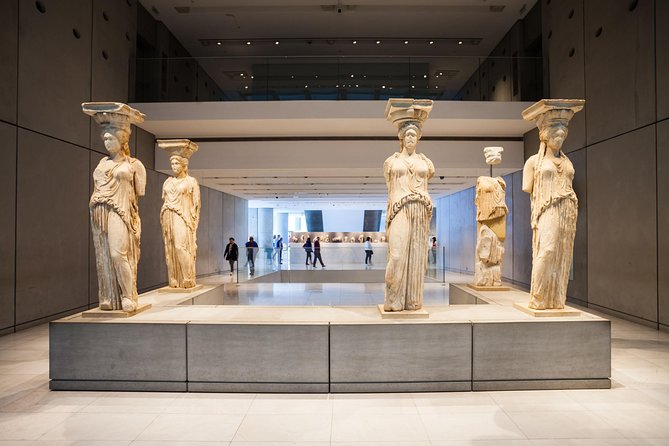
When you arrive, you go through the museum’s security check. The guidance asks you to avoid carrying large bags and luggage, because that’s where delay sneaks in. After that, you use the expedited line to get your ticket scanned.
The instructions also stress that your ticket can be printed or downloaded on your phone. So the practical move is to have it open and ready—don’t rely on your phone unlocking slowly while you’re standing in a queue.
One small nuance from real-world experience: the app experience is only as good as your willingness to follow the email instructions closely. A few visitors reported stress when setup steps weren’t completed in advance or when access didn’t feel clear. If you’re the type who hates tech before a trip, build extra time at home to set everything up calmly.
How Long You’ll Actually Spend: 1.5 Hours vs. Museum Time
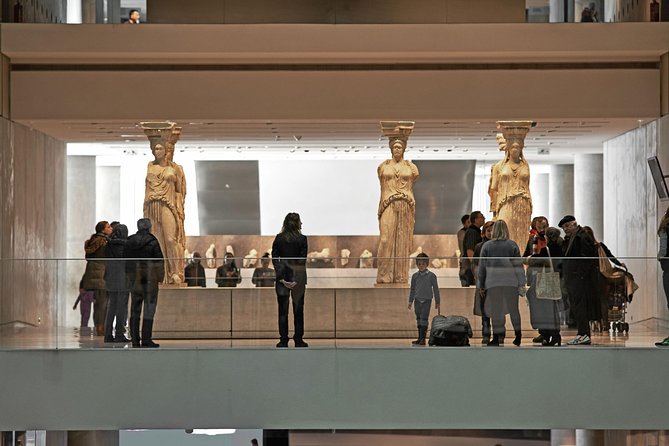
The listed duration is about 1 hour 30 minutes. That’s a good target if you move steadily and listen to the main segments without getting stuck reading every adjacent label.
But this museum rewards slowness. People also describe spending closer to two or three hours depending on interest and how often you pause to look at the details. If you want to see the underground area and the main Parthenon galleries carefully, I’d plan on more than the minimum.
A practical strategy: treat 1.5 hours as your baseline, then add time where the building pulls you in—like the underground displays and the Parthenon-focused floors.
Underground Athens: The Archaeological Site Beneath the Museum

Before you dive into the big galleries, don’t skip the underground area. The museum has an archaeological site in the open-air pavilion beneath the museum, and it’s described as fascinating and included with your ticket. People love this because it gives you a “you are standing on history” feeling before you start interpreting the art upstairs.
Why this works: it changes how the rest of the museum reads. Once you’ve seen the layers below, the artifacts feel less like a collection and more like a living timeline of Athens.
If you’re short on time, you might still want to do this early. One tip: try to fit it in before you get absorbed in the Parthenon Gallery, so the stories land with more context.






Archaic Gallery: Monsters, Heroes, Gods, and the Human Body

The first major storyline you’ll meet is the Archaic Gallery. This is where the audio approach makes a difference. Instead of staring at fragments, you get guided context for what you’re seeing—monsters, heroes, gods, and how ancient artists represented the human body.
The point here isn’t to memorize names. It’s to understand the shift in ancient art and the way myth and politics show up in sculpture and decoration. The audio tour frames these exhibits so your eyes know where to look next.
Possible drawback: if you’re hoping for an ultra-deep lecture on every single piece, you might feel the tour doesn’t cover everything. The self-guided format is designed to keep you moving through key themes, not to label every object you pass.
Parthenon Gallery: The Procession Comes Alive

Then the museum steps into the heart of the Parthenon story: the Parthenon Gallery. This is where the audio tour shines for most visitors because it connects the famous surfaces—like the frieze, metopes, and pediments—to the larger narrative of Athens.
You’ll learn about the Panathenaic Procession and how it appears on the frieze. The audio tour also highlights Greek mythology in stone, including scenes like the birth of goddess Athena and the battle of the Centaurs.
Here’s why it’s worth using the app: these details can feel like a jumble of figures if you’re just reading plaques. With the audio, you get a sequence—who’s doing what, and why that scene mattered.
If you’re a first-time visitor, don’t rush. This gallery is one of those places where a slightly slower pace makes your visit feel bigger than the time on the clock.
Third Floor Video Presentations: A Smart First Move

A practical tip: on the third floor, there are two video presentations. I’d recommend watching them early if it fits your schedule. People specifically mention that doing this first makes the rest of the museum make much more sense.
Why this matters: videos often provide the kind of “big picture” overview that plaques can’t deliver quickly. Then, when you return to the galleries, you recognize themes instead of just collecting facts.
Using the Offline Audio Guide Without Losing the Plot
The audio guide works through the Clio Muse App and is available on Android and iOS. It’s designed to be used while you walk, with an offline interactive map to help you keep your bearings.
A few practical notes that protect your day:
- Bring headphones. (Headsets aren’t included.)
- Make sure your phone has enough storage for downloads (100–150 MB).
- Keep your device charged.
- Use the offline map if you’re unsure where you are on which level.
One common complaint is that some people find the audio annoying or don’t listen the whole thing. My advice: don’t force it. Pause when you need to read or look closely, then press play again when you’re ready for the next story. The self-guided setup is meant for your pace, not a strict timeline.
Also, the audio isn’t tied to a live signal. The instructions say the audio tour can be used online or offline, and offline download is part of how you avoid roaming charges.
Navigation and Crowd Reality: Getting Lost Is Part of It
Even with an app, a museum this size can still make you feel turned around—especially when crowds bunch people near the most photographed displays. If you get turned around, the offline interactive map is your friend.
Some people also recommend starting earlier in the day. One review describes going right when the museum opened and enjoying about an hour with less crowd pressure. That kind of timing makes the audio feel calmer, because you’re not trying to listen over shoulder-to-shoulder noise.
If your schedule allows it, pick an opening-slot visit. If not, no stress—just build in the idea that entry and popular rooms can slow you down.
Who This Audio Ticket Works Best For (and Who Might Want a Live Guide)
This experience fits best if you like structure but also want freedom. It’s ideal for you if:
- You want to see the museum at your own speed
- You’re comfortable using a phone guide while you walk
- You prefer not to join a loud group that controls your pace
- You care about avoiding long lines via prebooked entry
It may not be the best match if:
- You strongly prefer a live guide to ask questions or explain in real time (a live guide isn’t included)
- You don’t enjoy audio narration while walking through exhibits
- You need coverage of every single object rather than key themes and highlights
Also, because it’s self-guided, it’s on you to decide what to skip. That flexibility is a feature, but it can feel like too much freedom if you want someone to make choices for you.
Final Verdict: Should You Book This Acropolis Museum E-Ticket and Audio Guide?
Book it if you want a smooth, time-saving entry and an audio guide that helps you understand the biggest hits—especially the Archaic and Parthenon galleries. The offline audio and offline interactive map make it easier to enjoy the museum without worrying about data or signal problems.
Skip it (or at least consider a different format) if you know you won’t use the audio actively. And if you’re traveling with older devices or you don’t want to deal with app downloads, the setup requirements can add stress.
If you do book: download everything before you go, bring headphones, and plan a realistic time window. Then go slow enough to let the Parthenon Gallery stories click—and don’t miss the underground site early, while the museum is still unfolding around you.
FAQ
How do I get my Acropolis Museum ticket and audio guide?
After booking, you receive an email with instructions and access details. You download the Clio Muse app and the audio tour, and your ticket can be scanned at the museum entrance. Tickets can be printed or downloaded on your phone, and the instructions recommend going directly to the expedited line for scanning.
Can I use the audio guide offline in the museum?
Yes. The tour includes offline content and an offline interactive map to help you avoid roaming charges. The audio tour can also be used online or offline, but you should download it ahead of time to ensure it works during your visit.
Do I need headphones, and is there a live guide?
You’ll need your own smartphone and headphones, since headphones are not included. There is no live guide with this activity; it’s fully self-guided.
What phones are compatible with the audio tour?
The audio tour is for Android and iOS smartphones. It is not compatible with Windows phones, older iPhone models (iPhone 5/5C or older), and older iPod/iPad generations listed in the compatibility notes.
What is the approximate visit length?
The duration is about 1 hour 30 minutes. In practice, you can take more time since it’s self-guided and you can move at your own pace.
Is this experience refundable?
No. This experience is non-refundable and cannot be changed for any reason.