REVIEW · KEY LARGO
Ultimate Florida Self Guided Driving & Walking Audio Tour Bundle
Book on Viator →Operated by Drive with Action · Bookable on Viator
Florida road trip, no tour guide in your ear. This Ultimate Florida Self Guided Driving & Walking Audio Tour Bundle strings together major stops—Tampa, A1A, St. Augustine, Miami, the Keys, the Everglades, and Big Cypress—using location-triggered narration so you can wander at your pace. You’ll also get a route built for long stretches, with one booking meant for a small group sharing the same car.
I especially like the setup: download-and-go offline maps, plus audio that plays automatically as you approach each story point. I also like that you can start and pause whenever you want, so you’re not locked into a rigid schedule in heat, traffic, or parking chaos. One drawback to plan for: you’ll need a phone that can handle the app and GPS, and you may feel like you didn’t get your money’s worth if you only do a quick slice instead of the full route.
In This Review
- Key highlights worth knowing up front
- How the app works (and why it matters more than you think)
- Price and value: $39.99 for a group, not a crowd
- Stop-by-stop route: Tampa to Big Cypress, in human terms
- Tampa: Riverwalk stories with pirates to crime bosses
- A1A South: Jacksonville Beach to Fort Matanzas (scenery with context)
- St. Augustine: Castillo de San Marcos, St. George Street, riverfront
- Miami: music and food stops, plus the big-city pulse
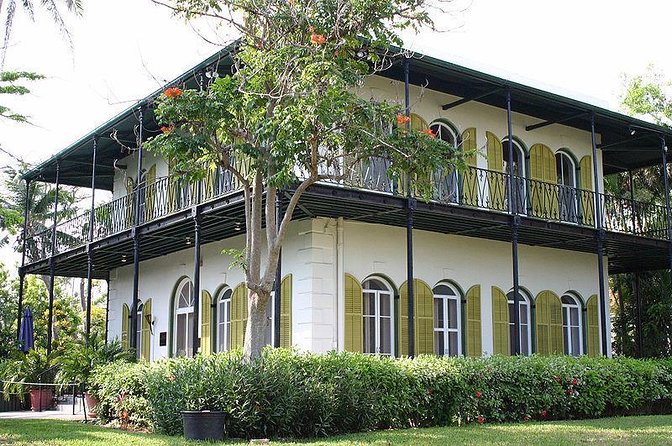
- Key West: GPS-enabled drive from Key Largo
- Everglades National Park: ecosystems, wildlife, and wetland scale
- Big Cypress: just north of the Everglades, with alligators and wading birds
- Driving vs walking: how to avoid missing content
- Timing that works: planning an 8–10 hour day without stress
- Setting expectations: tickets are not part of the audio
- Best for: road-trippers, curious walkers, and groups who share the car
- Should you book this Ultimate Florida bundle?
- FAQ
- Where does the tour start and end?
- How long does the full bundle take?
- Do I need cellular service during the tour?
- Can I start the tour whenever I want within the day?
- Do I need tickets or reservations for the attractions?
- Can I use the audio in my car?
- What if I’m walking part of the route?
- Is the bundle per person or per group?
- What’s the cancellation window?
Key highlights worth knowing up front
- Offline maps and offline audio mean you’re not hostage to cell service
- Audio plays automatically based on your location, so it feels hands-free
- One purchase covers up to 4 people in your car, which can beat typical per-person tours
- A mix of walking and driving stops keeps things varied across cities and parks
- Tampa includes a long Riverwalk-style loop with 20+ miles and 32+ audio stories in about 2–3 hours
How the app works (and why it matters more than you think)

This bundle runs through Action’s Tour Guide App. After booking, you get an email and text with a password and setup instructions. You’ll need to download the app content while you’re on strong Wi‑Fi or cellular, because after that, the tour is designed to work offline.
Once you’re onsite, open the app and start the correct tour version for your starting direction. There’s no person meeting you at the first point. You just find the first story location, and the audio begins on its own. As you move along the route, the next story cues itself to your position.
For the best listening experience, plan on using earbuds/headphones—especially for walking parts. For driving, the tour notes say you can connect your phone to your car stereo via Bluetooth, USB, or AUX. If you use Apple CarPlay, playback is compatible, and Android Auto support is described as coming soon.
You can also read our reviews of more tours and experiences in Key Largo.

Price and value: $39.99 for a group, not a crowd

The price is $39.99 per group (up to 4). That structure is the big deal. If you’re traveling as a couple, with friends, or with a family group, this can be far more cost-friendly than paying per person for a guided tour plus transport.
The tradeoff is that you’re paying for narration and routing, not attraction entries. Attraction passes, entry tickets, and reservations are not included. So your best value comes when you pair the audio stops with free-to-view streets, waterfronts, scenic highways, and park areas where you don’t need separate paid tickets.
Timing also affects value. The Tampa portion alone is described as a 20+ mile route with 32+ audio stories and about 2–3 hours to complete. If you’re the type who wants only a short highlight tour, you might feel the bundle is priced for more of a full-day plan (and for making extra stops along the way).
Stop-by-stop route: Tampa to Big Cypress, in human terms
This bundle is listed as roughly 8 to 10 hours total. Each stop is framed as a one- to two-hour audio experience, but the real length depends on how often you pull over, park, and check out side stops.
I’d think of this as two travel styles mixed together: city walking/routing on foot, and road-trip narration through bigger stretches. You can pause and restart at will, and you can skip what doesn’t grab you.
Tampa: Riverwalk stories with pirates to crime bosses
Tampa starts you with a walking-style Riverwalk route and history-style storytelling. The tone here is specific: it moves from pirates to crime bosses and beyond. If you like urban history told in story form (not just facts), this is the part that can feel the most lively.
The Tampa audio loop is described as long—20+ miles with 32+ audio stories, taking about 2–3 hours. That’s a commitment, so plan comfortable shoes and enough time to actually follow the route without rushing.
A practical consideration: because it’s a longer walking piece, you’ll likely want to start with a full battery and your listening gear ready. If you cut this short, the rest of the day can still be great—but this is one section where going “just for a taste” may under-deliver.
A1A South: Jacksonville Beach to Fort Matanzas (scenery with context)
Next is A1A South, framed as Florida’s most scenic coastal highway. The audio route begins in Jacksonville Beach and ends at Fort Matanzas. You’re moving through scenery plus history as you go, which is a good match for people who like to learn while still focusing on the drive.
This stop is listed as about 1 hour. In practice, that often means you’ll want to stay loosely on the route and not get distracted by every viewpoint—unless you’re okay stretching the time.
St. Augustine: Castillo de San Marcos, St. George Street, riverfront
St. Augustine is built around three anchors: Castillo de San Marcos, St. George Street, and the riverfront. Even if you’ve been to the city before, this audio route can help you connect what you see with what you’re hearing.
This stop is listed as about 1 hour. You’ll probably get the most from it if you plan to walk a bit rather than treat it like a drive-through. The narration approach makes it easier to notice details in the streetscape and landmarks as you move along.
The one caution: city walking tends to slow down naturally with parking, crossings, and stopping for photos. So buffer a few extra minutes if this is one of your tightest parts of the day.
Miami: music and food stops, plus the big-city pulse
Miami is pitched as Florida’s most unique city, with sun-and-sand energy plus music and food in Little Havana. This is a fun category of audio stop—less about one landmark and more about how the places feel and what they connect to.
It’s listed as about 1 hour. That’s a good length for a first pass. But if you want to snack, shop, or take a longer wander in Little Havana, keep in mind you can pause the tour and return later—without losing your place.
Key West: GPS-enabled drive from Key Largo
For the Keys, you shift into a GPS-enabled narrated route. The Key West piece focuses on the drive from Key Largo to Key West and is listed as about 2 hours.
This is where having your car audio working matters most. The audio cues are based on your location, so you’ll get smoother results if your phone is stable in its mount, your Bluetooth/AUX connection is solid, and your screen isn’t constantly waking and sleeping.
A reality check: highway mileage and traffic can change everything in the Keys. The tour is designed so you can pause when needed, but if you’re fighting heavy delays, consider trimming expectations for how tightly you’ll match a “2-hour” completion.
Everglades National Park: ecosystems, wildlife, and wetland scale
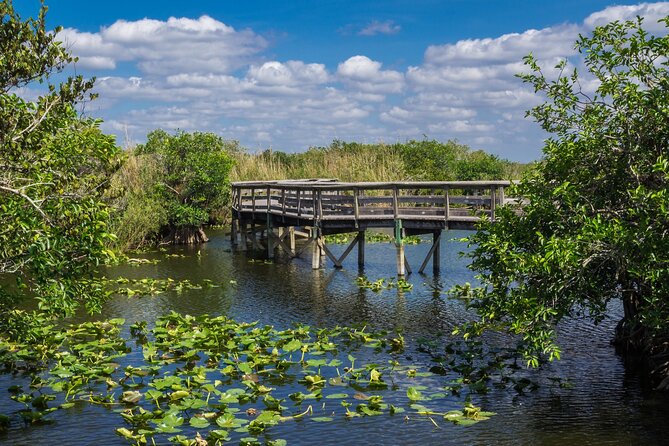
The Everglades stop is listed as about 2 hours and described as an immense wetland with lush flora, exotic wildlife, and varied ecosystems. That combination matters. You’re not just getting “spotting” tips—you’re getting a guided way to think about what you’re seeing as you move through the park areas tied to each story point.
If you’re the type who likes nature explained in plain language, this section is designed for you. You’ll learn about the Everglades and visit the coolest spots in the park as part of the route.
The main consideration here is time and attention. Two hours can disappear quickly when you stop to look, read, or simply watch birds and movement in the distance. The tour gives you pause control, so use it freely rather than feeling rushed.
Big Cypress: just north of the Everglades, with alligators and wading birds
Big Cypress is positioned as a hidden natural area north of the Everglades. The tour framing includes rich history and wildlife spotting potential like alligators and wading birds.
This stop is listed as about 1 hour. That’s a smart length for a second ecosystem switch: after spending time thinking “Everglades wetland,” Big Cypress gives you a nearby change of pace without swallowing your whole day.
If you’re going with kids or anyone who wants shorter bursts, Big Cypress is likely the easiest win in the bundle—enough time for meaningful stories, not so long that it becomes a grind.
Driving vs walking: how to avoid missing content

This bundle is called a driving and walking audio tour bundle, and that matters. The app includes both driving versions and walking versions tied to different city areas. If you accidentally run a walking tour while you’re in the car (or vice versa), your pacing will feel off, and you may think you missed sections.
So here’s the practical move: when you launch the tour in the app, choose the version that matches your planned starting point and direction. If you’re unsure, take a minute before you start rolling. That’s the difference between a smooth day and that annoying moment where you’re listening to the right narration but the route doesn’t match what you’re doing.
For walking parts, bring headphones. For driving, connect your phone to your car’s audio system. If you’re using CarPlay, the audio is compatible; Android Auto support is described as coming soon, so don’t bet your day on it if you’re on the wrong side of compatibility.
Timing that works: planning an 8–10 hour day without stress

The overall bundle is listed as roughly 8 to 10 hours. That’s long enough to count as a major day trip, but flexible enough to break into chunks.
Here’s a timing approach that keeps things enjoyable:
- Treat Tampa as the big time block since it’s described as a 20+ mile, 32+ story route (2–3 hours).
- Treat Miami and St. Augustine as shorter city blocks (about 1 hour each).
- Treat A1A South as a steady, scenic driving stretch (about 1 hour).
- Plan Key West as a longer driving story (about 2 hours).
- Keep Everglades and Big Cypress as your “nature day” anchors (about 2 hours, then about 1 hour).
Because the tour lets you pause anywhere and start anytime, you can adjust for real life: meal breaks, parking, and photo stops. One tip: if you know you’re going to be short on time, don’t assume you can “half do” everything and still feel satisfied. The bundle’s pacing is built for following the route cues and letting the stories play as you move.
Setting expectations: tickets are not part of the audio
Every stop is labeled Admission Ticket Free, which is good news for the audio itself. But the bundle explicitly says attraction passes and entry tickets are not included.
So think of the audio as your guide to what to notice and where to go, not as a substitute for paid attractions. If a specific site needs an entrance ticket, you’ll have to decide separately whether it’s worth paying.
This also affects how you build your day. If your goal is to see famous places without added fees, you’ll be happier. If you want a checklist of paid attractions, plan your budget beyond the $39.99 bundle.
Best for: road-trippers, curious walkers, and groups who share the car

This bundle fits best if you:
- Want an easy self-guided day with offline audio and GPS-triggered stories
- Like history and place-based storytelling, not just random facts
- Travel with 2–4 people in one vehicle (because the price is per group)
- Don’t want to coordinate meeting times with a human guide
It’s also a good fit if you enjoy a mix of city streets and outdoor ecosystems. The Tampa city walk, the coastal A1A drive, the Keys route, then the Everglades/Big Cypress stop is a nice sweep.
If you hate walking, or you’re short on time, you may find it’s better to target one or two sections rather than forcing a full-day attempt. The bundle is designed for following the full route.
Should you book this Ultimate Florida bundle?

Yes, if you want a low-effort way to make a Florida road trip feel like more than driving from sign to sign. The biggest reasons to book are the offline functionality and the hands-free location-triggered audio, plus the group price that can be a bargain when you’re splitting a car.
I’d say don’t book it if you’re only looking for a quick 30–45 minute sampler of Florida. The format works best when you give it time—especially the Tampa Riverwalk section, which is long by design.
One last check before you start: confirm the access period shown in your instructions. The materials describe buying for one year and also talk about lifetime access with no expiry. Since it’s in the provided details, it’s worth verifying what your account shows so you’re not surprised later.
If you want a self-guided Florida day that stays flexible, has strong narration support, and doesn’t punish you for missing cell service, this is a solid pick.
FAQ
Where does the tour start and end?
You start at the tour’s first story point and the experience ends back at the meeting point (where you started).
How long does the full bundle take?
The bundle is listed as about 8 to 10 hours total, with individual stops taking around 1–2 hours each.
Do I need cellular service during the tour?
No. The tour includes offline maps and is designed to work without cellular or Wi‑Fi after you download it properly.
Can I start the tour whenever I want within the day?
Yes. The tour is designed for you to start anytime and pause anywhere at your own pace.
Do I need tickets or reservations for the attractions?
Attraction passes, entry tickets, and reservations are not included. The audio stops are marked as admission ticket free, but paid sites are still your responsibility.
Can I use the audio in my car?
Yes. The tour notes say you can connect your phone to your car stereo using Bluetooth, USB, or AUX. CarPlay compatibility is mentioned.
What if I’m walking part of the route?
For walking tours, the guidance says headphones/earbuds will give you the best experience.
Is the bundle per person or per group?
It’s per group. The purchase is for up to 4 people in a car.
What’s the cancellation window?
Free cancellation is available up to 24 hours before the experience start time for a full refund.