REVIEW · CHICAGO
Chicago Millennium Park Self-Guided Walking Tour
Book on Viator →Operated by History with Action · Bookable on Viator
A first stop, then you wander on. This self-guided Millennium Park audio tour uses location-based storytelling so you can move at your pace and hit the park’s biggest moments. I especially like the offline maps, so your walk doesn’t depend on spotty signal.
My other favorite thing is how the tour runs hands-free once you start the first story—audio cues trigger automatically as you reach each stop. One consideration: if you switch apps to take photos, the tour can pause and you may need to use a resume option to get back where you left off.
In This Review
- Key points before you go
- Millennium Park at your pace: what self-guided really means here
- Price and value: $14.99 for lifetime access that can work on future trips
- Getting the app set up: how to make sure it works offline
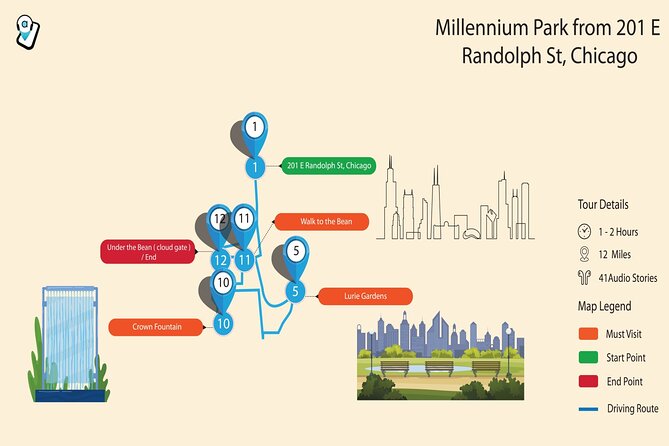
- Where the tour starts and how you’ll actually follow it
- How long it really takes: essentials in 20–30 minutes, or a full 1–2 hour loop
- Stop: Jay Pritzker Pavilion—starting with a music-focused landmark
- Stop: Lurie Garden—plant design you can slow down for
- Stop: Nichols Bridgeway—one bridge, two worlds
- Stop: Crown Fountain—interactive public art for a quick reality check
- Stop: Cloud Gate—The Bean, framed by AT&T Plaza
- What you’ll like most about the audio: hands-free and offline
- The one glitch to plan for: switching apps can interrupt playback
- Quick match: who this tour suits best
- Should you book this Millennium Park self-guided walking tour?
- FAQ
- What is the price of the Chicago Millennium Park Self-Guided Walking Tour?
- How long does the Millennium Park self-guided tour take?
- Where does the tour start?
- Does the tour work offline?
- Do I need tickets or attraction admissions?
- How do I start the tour once I arrive?
- What device do I need for the best experience?
- Can I cancel and get a refund?
Key points before you go

- Offline maps after download mean you can walk without cellular or Wi‑Fi.
- Hands-free audio by GPS location plays the next story as you arrive.
- Start at the Millennium Park Welcome Center (201 E Randolph St) and loop back to the same point.
- A short essentials route can be done in about 20–30 minutes, or stretched to 1–2 hours with breaks.
- Lifetime access with no expiry lets you use it on future trips, any time, as often as you want.
- Bring headphones so you can actually hear the narration while you explore.
Millennium Park at your pace: what self-guided really means here

Chicago’s Millennium Park is built for stopping. You’ll pause for photos, linger near public art, and take that slow walk along the edges just to see how the light hits the surfaces. This tour is designed for that reality.
Instead of following a group with a strict schedule, you control the rhythm. You can start within the park hours (the activity lists 6:00 AM–9:00 PM daily), pause for snacks and pictures, and restart when you’re ready. That flexibility matters most at Millennium Park, because the most famous sights are open-air and photo-heavy—so you never feel rushed.
The route is also practical. It’s described as about a 1-mile-long walk covering the essentials, with an estimated 20–30 minutes for the core experience. If you want more context, you can easily stretch it into the 1–2 hour window by letting the audio run, taking detours you enjoy, and spending time at each stop.
You can also read our reviews of more tours and experiences in Chicago.



Price and value: $14.99 for lifetime access that can work on future trips
At $14.99 per person, this tour is not trying to replace a guided tour. It’s trying to be useful fast and keep paying you back.
Here’s the value logic:
- You’re not buying a one-time visit. The access is lifetime with no expiry, and you can use it anytime on any trip.
- You can repeat at different seasons. Millennium Park changes with weather and crowds, and you can redo the walk when you’re back in Chicago without paying again.
- You’re paying for narration + structure, not admission. The tour doesn’t include attraction tickets, passes, or reservations—so your cost is strictly for the audio walking experience.
If you’re the type who likes to wander and soak in details on your own schedule, $14.99 can be a bargain. If you know you prefer a live guide, you may find you’d rather put that money toward a traditional tour. But for a self-paced loop where you get spoken context at each landmark, the pricing is hard to argue with.
Getting the app set up: how to make sure it works offline

This is an app-based experience called Action’s Tour Guide App. After booking, you get an email and a text with setup instructions and a password (the instructions say to search for audio tour in your messages).
The key step is the offline promise:
- The download must happen while you’re on strong Wi‑Fi or cellular.
- After download, the tour works without cellular or Wi‑Fi thanks to offline maps.
That means you’ll want to plan a quick tech moment before your walk. Once you’re onsite at the Millennium Park Welcome Center, open the app and start the tour while connectivity is still reliable.
Pro tip: use headphones from the start. The tour recommends earbuds/headphones for the best experience, and you’ll be in a place with plenty of ambient noise.
Where the tour starts and how you’ll actually follow it
You meet at Millennium Park Welcome Center, 201 E Randolph St, Chicago, IL 60601, and the activity ends back at the meeting point.
No one meets you. That’s part of the self-guided format. You’ll:
- Go to the start point.
- Enter the password sent by email/text (the same password can be used on the same number of devices as travelers booked).
- Open the Action audio tour app once you’re onsite.
- Start at the first story’s point, then follow audio cues to the next story.
The audio is built to be location-based. Once it’s running, the narration should play automatically as you move through the route. If there are multiple tour versions, the instructions say to launch the one with your planned starting point and direction.
And when something goes wrong, there’s a safety net: if you face audio issues, you can contact support.
How long it really takes: essentials in 20–30 minutes, or a full 1–2 hour loop
The description is clear: this is a short loop focused on Millennium Park essentials. It’s listed as a 1-mile-long tour that covers the key sights in about 20–30 minutes.
But the booked duration is 1 to 2 hours (approx.). That’s your clue that the app experience is meant to scale:
- Do the quick version if you’re crunched on time.
- Stretch it by lingering at each stop, replaying a moment you liked, and taking breaks for photos and snacks.
This is where self-guided shines. You don’t have to keep moving just because someone else is ready. You can pause when you want the perfect angle for the skyline reflections, then continue when the crowd shifts.


Stop: Jay Pritzker Pavilion—starting with a music-focused landmark

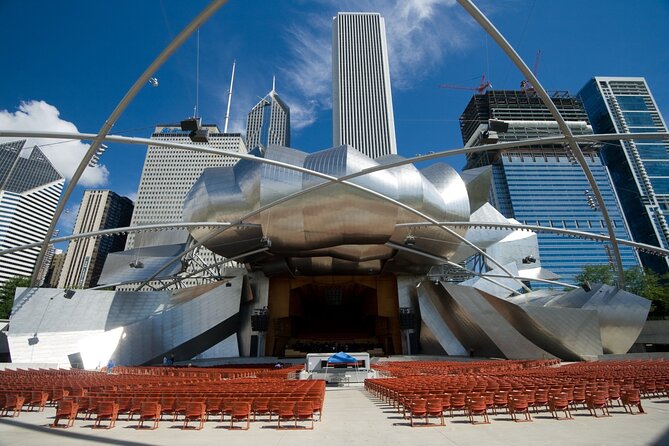
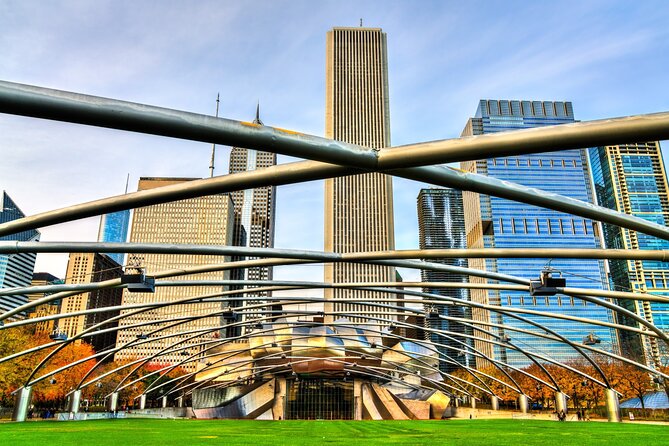
Your tour’s first stop is Jay Pritzker Pavilion, also called Pritzker Music Pavilion or simply the Pritzker Pavilion.
Even before you learn the details, the pavilion is a useful anchor point. It helps you orient yourself in the park’s core area near Randolph Street and Michigan Avenue surroundings. The audio narration starts here, which is smart for first-time Millennium Park visitors because you’re not guessing where to begin.
What to expect from this stop in the tour:
- The story gives you a landmark to orient on as you start.
- You’re set up for the rest of the loop—moving from the pavilion into gardens and pedestrian routes.
If you’re the kind of person who hates walking in circles without meaning, starting at a clear focal point like the pavilion keeps your walk feeling intentional.
Stop: Lurie Garden—plant design you can slow down for

Next up is Lurie Garden, a 2.5-acre garden at the southern end of Millennium Park.
This stop is built for slowing down. The narration highlights it as a garden composed of perennials, bulbs, grasses, shrubs, and trees, and it also gives a specific opening date: it opened July 16, 2004. The tour credits the design team: GGN, Piet Oudolf, and Robert Israel.
Why this matters on a walking tour:
- Millennium Park can feel like a photography circuit. Lurie Garden offers a calmer pace.
- Having the app explain what you’re looking at helps you see beyond the visual surface—especially when you’re seeing layers of plantings rather than one single feature.
Take your time here. Even if you’re doing the 20–30 minute essentials route, Lurie Garden is the best place to add a few minutes without feeling like you’re breaking the plan.
Stop: Nichols Bridgeway—one bridge, two worlds
From Lurie Garden, the tour brings you to Nichols Bridgeway.
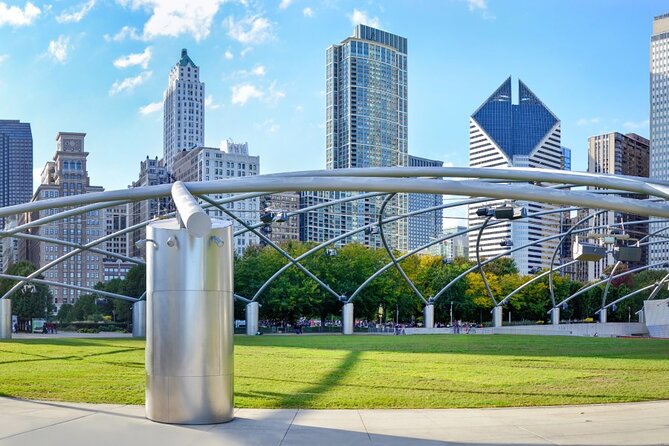
This pedestrian bridge crosses Monroe Street and connects from the Great Lawn of Millennium Park to the third floor of the West Pavilion of the Modern Wing of the Art Institute of Chicago. It’s also described as part of the park’s movement system—another reason it works well for a self-guided walk. The bridge is a transition point, not just a photo stop.
What makes this stop useful:
- You get a clear “movement story” for how pedestrians navigate between Millennium Park and the Art Institute’s newest wing at that level.
- The audio makes the bridge feel like more than just an Instagram angle.
Also, since it’s a bridge you’ll naturally walk across, the hands-free audio model fits perfectly here. You don’t need to stop to read signs or search for context.
Stop: Crown Fountain—interactive public art for a quick reality check
Next is Crown Fountain, described as an interactive work of public art and video sculpture.
The tour gives you the design credit: it was designed by Catalan artist Jaume Plensa and executed by Krueck and Sexton Architects. It also lists an opening date in July 2004.
Crown Fountain is the kind of stop where your walk naturally turns into a pause. It’s interactive, which means it’s easy to get caught watching what’s happening and forgetting you had a schedule.
A practical way to handle it on this tour:
- Treat it like a planned break, not a detour.
- If you want a faster version of the walk, spend enough time to catch the interactive element, then move on.
This is a great stop if you’re traveling with someone who likes art that behaves like a living thing rather than a static sculpture.
Stop: Cloud Gate—The Bean, framed by AT&T Plaza
The tour’s big finale is Cloud Gate, also known as The Bean.
The description is specific and helpful: Cloud Gate is a public sculpture by Indian-born British artist Sir Anish Kapoor, and it’s the centerpiece of AT&T Plaza at Millennium Park. The sculpture sits on top of Park Grill and is located between the Chase Promenade and McCormick Tribune Plaza & Ice Rink.
This last stop does two jobs:
- It gives you the most recognizable visual payoff in Millennium Park.
- It gives your audio narrative a strong landing place, where you can take time to enjoy how the surroundings warp across the sculpture’s surface.
If you’re doing photos, Cloud Gate is where your patience pays off. With a self-guided setup, you can stay as long as you want, then head back without feeling like you’re abandoning a group.
What you’ll like most about the audio: hands-free and offline
This tour’s design centers on ease.
You’re told:
- Hands-free playback: audio stories play on their own based on location.
- Offline maps: it works without cellular or Wi‑Fi after you download.
- Start anytime, pause anywhere: you control the walking pace, plus breaks for photos and snacks.
- Go deeper when you want: you can learn more with extra stories tied to what you choose to hear.
In plain terms, this means you’re not constantly checking your phone. You can keep walking, look around, and let the narration tell you what you’re seeing.
And that matters, because Millennium Park is full of visual distractions. If you’re always trying to read details off a screen, you miss the “walk and notice” part.
The one glitch to plan for: switching apps can interrupt playback
One thing to be aware of is how the tour behaves if you toggle away from the audio during your walk.
A common annoyance described is that when someone switched away to take a photo, the audio paused and the tour needed restarting. The fix suggested is using a resume feature so the tour can pick up where you left off.
So here’s the practical approach:
- Use your phone for photos, but try not to fully exit the audio experience.
- If the tour pauses, look for the resume option rather than restarting from scratch.
It’s a small issue, but it’s exactly the kind of problem that matters when you’re trying to enjoy an art-heavy stop like Crown Fountain or Cloud Gate.
Quick match: who this tour suits best
This self-guided walk is a good match if you:
- Want Millennium Park highlights without being locked into a group pace.
- Like spoken context as you move, especially at Cloud Gate, Crown Fountain, and Lurie Garden.
- Prefer offline freedom. You don’t want to worry about signal at every turn.
- Want a tool you can reuse later thanks to lifetime access.
It may be less ideal if you:
- Want a live guide to answer questions in real time.
- Need constant assistance navigating on a phone (the tour relies on a phone with GPS support, and the instructions recommend devices with GPS and cellular connectivity for navigation).
- Get frustrated easily by app interruptions when switching away for photos (use resume if needed).
Should you book this Millennium Park self-guided walking tour?
Book it if you want a structured, low-cost way to see Millennium Park’s biggest public-art moments and still keep your own timing. The combination of offline maps, hands-free location audio, and lifetime access makes it a tool you can use multiple times, not a one-off expense.
Skip it if you already know you’ll only be happy with a live, interactive guide. For everyone else, this is a smart way to turn an iconic park visit into a more meaningful walk—without adding complicated logistics.
FAQ
What is the price of the Chicago Millennium Park Self-Guided Walking Tour?
The tour costs $14.99 per person.
How long does the Millennium Park self-guided tour take?
The duration is about 1 to 2 hours, and the essentials route is described as roughly 20–30 minutes.
Where does the tour start?
It starts at the Millennium Park Welcome Center, 201 E Randolph St, Chicago, IL 60601, USA.
Does the tour work offline?
Yes. Offline maps are included, and the tour is said to work perfectly without cellular or Wi‑Fi after you download it.
Do I need tickets or attraction admissions?
No. Attraction passes, entry tickets, or reservations are not included.
How do I start the tour once I arrive?
After booking, you’ll receive instructions and a password. Then, open Action’s separate audio tour guide app once onsite and start at the first story’s point. Audio should begin automatically based on your location.
What device do I need for the best experience?
The instructions recommend an iPhone running iOS 15 or later, an Android device running version 9 or later, or an iPad/tablet with GPS and cellular connectivity for navigation.
Can I cancel and get a refund?
Yes. You can cancel for free up to 24 hours in advance for a full refund. If you cancel less than 24 hours before the experience’s start time, there’s no refund.