REVIEW · AUSTIN
Austin Self-Guided Driving & Walking Audio Tour Guide
Book on Viator →Operated by Drive with Action · Bookable on Viator
Austin sounds best when you don’t rush it. This self-guided GPS audio tour turns a car ride into a story-filled walk along the Colorado River. You get a hands-free experience where the narration cues itself as you move, plus an offline setup that helps you keep going even when your phone loses signal.
What I like most is the mix of viewpoints and stops: from Mount Bonnell-area scenery down into Downtown Austin’s historic core. The route also makes families easy, since you’re buying one tour per car (up to 4), not one ticket per person.
One thing to keep in mind: the “where am I right now” part can get a little confusing near the Capitol/Downtown area, and a few turns may take extra attention. So go slow at intersections and be ready to pause and listen when navigation gets hectic.
In This Review
- Key things to know before you start
- How the GPS audio tour really works (Mount Bonnell to Congress Ave.)
- Price and value: $16.99 per group plus lifetime access
- Timing reality check: 1–2 hours or 3–4 hours?
- Navigation gotchas near Downtown (and how to avoid frustration)
- Stop 1: Bull Creek District Park and Austin’s river-green story
- Stop 2: Pennybacker Bridge Overlook for the 360 Bridge views
- Stop 3: Wild Basin Preserve and the weekend fee detail
- Stop 4: Zilker Botanical Garden’s 28 acres (including Japanese garden vibes)
- Stop 5: Barton Springs with swim energy and kids-friendly extras
- Stops 6–7: Paramount Theatre and the Angelina Eberly Statue in Downtown
- What to listen for so the stories actually land
- Who this Austin audio tour is best for
- Should you book this Austin self-guided audio tour?
- FAQ
- How much does the Austin self-guided audio tour cost?
- How long does the tour take?
- Where does the tour start and end?
- Does it work offline without cell signal or Wi‑Fi?
- What do I need to use the audio tour?
- How does the audio play as I move around?
- Do I need attraction tickets or reservations?
- Can I pause the tour and start again later?
- How can I listen to the audio while driving?
- Is the app compatible with both iPhone and Android?
Key things to know before you start
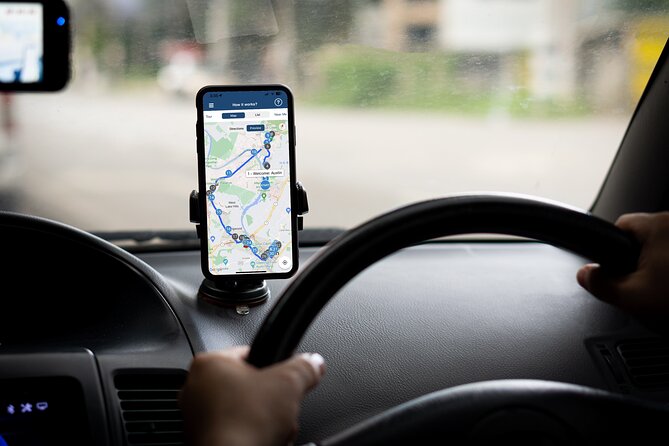
- Offline by design: download first, then the tour plays without cellular data or Wi‑Fi.
- GPS-triggered audio: stories start on their own based on where you are.
- Price is per group (up to 4): $16.99 per group can be great value versus per-person tours.
- Family-friendly stops: parks plus Barton Springs features that kids tend to enjoy.
- Route length varies by how complete you go: plan for up to 19+ miles and about 3–4 hours for the full run.
- Some stops may have small weekend fees: Wild Basin Preserve can cost a bit on weekends/holidays.
How the GPS audio tour really works (Mount Bonnell to Congress Ave.)

This is a self-guided driving + walking audio route. You start at 3800 Mt Bonnell Rd, Austin, TX 78731, and the tour ends on Congress Ave (Congress Avenue) in Downtown. No guide meets you. You load the app, start the first story point, and then you follow the audio cues to the next location.
Setup is the make-or-break step. After booking, you get an email/text with a password and instructions. You need to download the tour while you’re on strong Wi‑Fi/cellular, then it should work offline after that. If you try to download only after your signal drops, you risk losing the whole audio experience.
For the audio itself, you’ll want to connect your phone to your car stereo using Bluetooth, USB, or AUX. For the walking portions, I’d also consider headphones if you want clear sound without sharing it with the whole cabin.
When you park, the tour doesn’t force you to move. You can start anytime and pause anywhere, so you can grab a snack, take a photo, or just sit and let the Colorado River breeze do its job.
You can also read our reviews of more tours and experiences in Austin.
Price and value: $16.99 per group plus lifetime access
The headline number is $16.99 per group (up to 4 people). That can be a bargain if you’re traveling as a small family or a couple with friends, because it’s priced per car—not per person.
Then there’s the “you can use it again” part. This purchase includes new, lifetime access with no expiry, meaning you can replay it anytime on future trips. If you’re the type who returns to cities more than once, that matters.
The route also focuses on practical sightseeing without requiring attraction tickets. Stops like the Zilker Botanical Garden, Barton Springs area, and Downtown landmarks are free to enter as part of this tour plan, so you’re mostly spending on the audio and your own time.
Timing reality check: 1–2 hours or 3–4 hours?
The tour is listed as about 1 to 2 hours depending on how you pace it. But the route note says it’s over 19+ miles long with 20+ audio stories, and it can take about 3–4 hours to complete.
Here’s how I’d plan it: if you drive between stops, do quick photo breaks, and move when the story says move, you can shorten it. If you actually linger—like you should at viewpoints and gardens—budget more time. You’ll be happier if you treat the “10 minutes” per stop as a minimum, not a promise.
Also, the tour blends driving and short walking moments. That means you’ll want water and sun protection. Austin loves to remind you that the calendar is not your friend.
Navigation gotchas near Downtown (and how to avoid frustration)
The biggest risk isn’t the content—it’s the flow of directions. A couple of people found it tricky to reconnect with their exact position near Downtown by the Capitol, and one person reported an incorrect turn instruction near a bridge area.
Here’s the practical fix: when you approach intersections or complex road sections, slow down and double-check the street layout before making turns. If you miss a cue, don’t panic. Pull over safely, let the app catch up, and listen to what it says next.
If you feel like you’re getting “story overload” in a dense area, use your own judgment. Pause the tour briefly, then start it again when you’re parked. You’ll get more value from the narration when you’re not half-driving and half-trying to process audio.
Stop 1: Bull Creek District Park and Austin’s river-green story

Your tour kicks off at the Bull Creek District Park area. The audio frames Austin as a capital candidate thanks to its place along the Colorado River, which helped greenery thrive even in a harsher environment. The park is the kind of starting point that makes the city feel less like a grid and more like a living landscape shaped by water.
What you’ll likely enjoy here is the shift in tone. Instead of jumping straight into Downtown, you begin with the river-adjacent green space that makes Austin’s outdoors reputation make sense. It’s also a good “warm-up stop” for families because parks are naturally flexible: you can do a short walk, stretch, or just listen.
Consideration: since this stop is early, you may want to confirm your audio setup before you leave the starting area. If the app isn’t playing cleanly at the beginning, it can make later cues feel harder to follow.
Stop 2: Pennybacker Bridge Overlook for the 360 Bridge views
Next up is the Pennybacker Bridge Overlook. The story points you toward the viewpoint over the Colorado River and references the local nickname the 360 Bridge. That nickname is doing a lot of work here: the point is that the outlook offers wide, circular-feeling angles that make the river and hillside geography feel dramatic.
This is one of those stops where you can quickly tell if the tour is working for you. When the narration lines up with a viewpoint, it turns a scenic pull-off into a meaningful moment instead of just another photo stop.
Practical tip: give yourself a few extra minutes for the overlook if you’re going in hot weather. You’ll be standing still, and your shade plan matters.
Stop 3: Wild Basin Preserve and the weekend fee detail
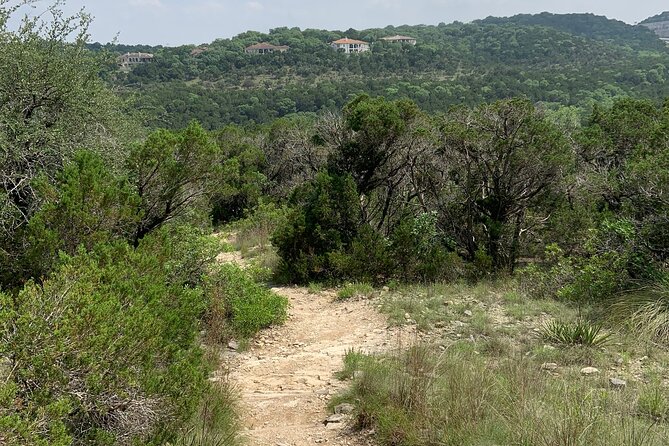
Then you reach Wild Basin Wilderness Preserve, a preserved area with over 200 acres and three miles of hiking trails. The big value here is contrast: you go from city-adjacent viewpoints into a more “protected land” feeling spot.
The audio plan includes a note about fees: a small fee may apply on weekends and holidays, but it’s free and open during weekdays. So if you’re traveling on a Saturday, Sunday, or a holiday, check that day’s conditions before you show up expecting it to be exactly like a weekday stroll.
If you want to keep this tour manageable, treat this stop like a flexible hiking moment rather than a full trail commitment. Even a short walk can make the storytelling land better because it’s tied to the idea of preserved wilderness.
Stop 4: Zilker Botanical Garden’s 28 acres (including Japanese garden vibes)
From the preserve, the tour heads to Zilker Botanical Garden, with 28 acres of local and exotic flora. This is a “slow down and look” stop. The narration includes details about native succulents, “prehistoric plants,” and even a Japanese garden.
This is also a stop where families usually do better than they think they will. Kids don’t always love history lessons, but they often enjoy plant variety and labeled garden areas. For adults, it’s a break from the drive-stop-drive rhythm.
Consideration: botanical gardens can make time disappear. That’s not a problem unless you’re trying to squeeze the full route into a tight schedule. If you’re short on time, you might focus on the key sections the audio emphasizes most.
Stop 5: Barton Springs with swim energy and kids-friendly extras
Next is Barton Springs, a three-acre, spring-fed pool that locals treat as a favorite swimming spot. The tour also notes extras that make it more than just a pool photo: a miniature train for kids and a community theater that puts on free shows for the public.
This stop has a strong “Austin in real life” feel. Even if you don’t swim, Barton Springs is the kind of place where you can see how the city uses its natural features.
Practical thought: if you want to stretch the family fun, plan your timing around your comfort with water and crowds. If you’re just sightseeing, you’ll still get a lot from the surrounding area and the audio context.
Stops 6–7: Paramount Theatre and the Angelina Eberly Statue in Downtown
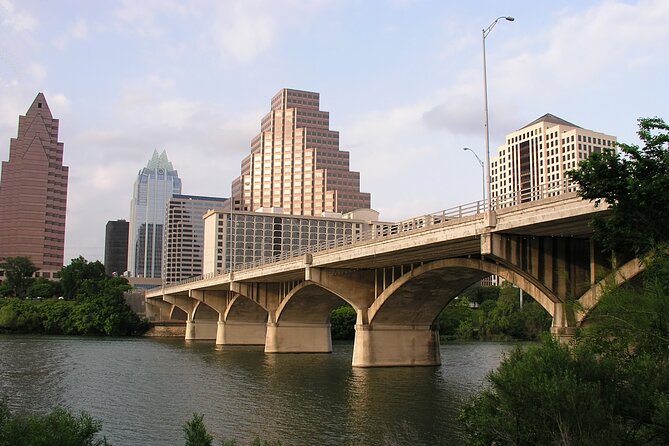
As you transition into Downtown, the tour points you toward the big Paramount Theatre landmark. The audio includes a specific origin story: it began in 1915, when architect John Eberson designed what was originally called The Majestic. That kind of detail is what turns a sign into something you can actually visualize.
Then the route ends at the Angelina Eberly Statue, with background about Austin in 1842, when it was technically the capital of Texas. The audio frames Austin as a frontier town under threat, with risk of being seized by Mexico at any moment. That context helps Downtown history feel less like trivia and more like stakes.
These final stops are worth treating as your “payoff.” You’ve built a picture of Austin through rivers, preserves, gardens, and spring-fed nature—then the city’s institutions and monuments make sense in contrast.
Potential drawback: Downtown can be busy and road layouts can be confusing. One of the common frustrations in feedback was missing turns or being told to head the wrong direction, so keep your eyes on intersections even if the audio is talking.
What to listen for so the stories actually land
A self-guided audio tour only works if the audio and your pace match. Here’s how to make it click:
- When the app triggers a story near a viewpoint, try not to rush past it. Let the words do their job while the scenery is still in front of you.
- Use pause breaks at the places that matter most to you—overlooks, gardens, and the spring area.
- If you’re driving with multiple people, connect audio to the car stereo so everyone hears the same thing. If you’re walking, headphones can keep the narration clear without background noise.
And here’s the simple truth: Austin is a city with lots of side trips. The tour gives you structure, but you should still feel free to wander a block or two if something catches your eye.
Who this Austin audio tour is best for
This tour shines for people who want structure without a fixed schedule. If you enjoy history but you also want fresh air and views, the Colorado River-to-Downtown flow is a nice match.
It’s also a smart pick for:
- Families in one car (you buy once per car, up to four).
- Travelers who want to avoid per-person ticket pricing.
- People who like self-paced plans and don’t want to wait for a group.
If you hate any chance of tech hassle, consider the backup plan. You’ll need a strong Wi‑Fi/cellular moment early to download the tour. You’ll also want to pay attention at tricky turns near Downtown.
Should you book this Austin self-guided audio tour?
Book it if you want a cost-effective, offline-capable way to see Austin with GPS-triggered storytelling. The route makes sense: river viewpoints, preserved wilderness, plant variety, then spring and Downtown landmarks. With lifetime access, it can also become a “return to it later” kind of purchase.
Skip it or approach with extra patience if you’re the type who gets irritated when navigation feels off in dense areas. Make peace with the fact that you may need to slow down, pull over once, or double-check turns so the audio cues stay aligned.
If you fit the first group, you’ll likely have a smooth time—and you’ll come away with more than just a list of places. You’ll have a guided sense of how Austin connects water, wilderness, and historic Downtown in one easy route.
FAQ
How much does the Austin self-guided audio tour cost?
It costs $16.99 per group, and each group can include up to 4 people.
How long does the tour take?
It’s listed at about 1 to 2 hours, and the full route note says it can take about 3 to 4 hours to complete.
Where does the tour start and end?
The start is at 3800 Mt Bonnell Rd, Austin, TX 78731. The end is on Congress Avenue (Congress Ave.) in Austin, TX 78701.
Does it work offline without cell signal or Wi‑Fi?
Yes. You must download the tour while you’re in strong Wi‑Fi/cellular, but after that it works offline with no cellular or Wi‑Fi required.
What do I need to use the audio tour?
You download the separate tour app by Action’s Tour Guide App, then enter the password sent by email and text after booking.
How does the audio play as I move around?
Open the app onsite and start the first story point. The audio stories play automatically based on your location, and you follow audio cues to reach the next stop.
Do I need attraction tickets or reservations?
No attraction passes, entry tickets, or reservations are included or required as part of the tour plan.
Can I pause the tour and start again later?
Yes. You can start anytime and pause anywhere to take breaks for photos or snacks.
How can I listen to the audio while driving?
You can connect your phone to your car stereo using Bluetooth, USB, or AUX. For walking, headphones are recommended for best clarity.
Is the app compatible with both iPhone and Android?
The information provided says iPhones running iOS 13 or newer and Android devices version 9 or newer are supported. For iPads or tablets, models with GPS and cellular connectivity are recommended.