REVIEW · WINDHOEK
Namibia Self-Driving Audio Guide (in English & German)
Book on GetYourGuide →Operated by OYO Travel GmbH · Bookable on GetYourGuide
Road-trip Namibia gets smarter with audio. This self-guided drive pairs GPS-guided audio with a rental-car setup so you can learn as you roll, not while parked. I love that you can play pieces by location on the map or let it run automatically during your ride, and I also love that you can connect your phone to the car radio so everyone hears the story.
One thing to plan for: the voucher is tied to one smartphone, and the download has to be handled carefully since connectivity can be weak in Namibia. Bring a charged phone, and give yourself time to install after you book so you do not end up troubleshooting on the road.
In This Review
- Key highlights at a glance
- Why this Namibia audio guide fits a self-drive trip
- Getting sound in the car: phone-to-radio is the real win
- How the GPS map control works while you drive
- What the guide covers: Kaokoland to Fish River Canyon, in story-sized chunks
- Kaokoland: start with a sense of place
- Etosha National Park: wildlife with context in your ears
- Windhoek: transition from big nature to human scale
- Swakopmund: when the coast changes the conversation
- Fish River Canyon: save the broad finale for the finale
- Choosing what to play: 225 audio files and about 10 hours
- English and German switching: clarity matters out on the road
- Price and value: $29 per person, but per smartphone for the voucher
- What’s not included, and why that’s normal for self-drive
- Getting set up after booking: the email you should watch for
- Who should book this (and who might skip it)
- Should you book this Namibia self-driving audio guide?
- FAQ
- Is there a fixed meeting point for this self-driving audio guide?
- What languages are available in the audio guide?
- How much audio content do I get?
- Can I listen through the rental car’s audio system?
- Is the voucher code valid per person or per smartphone?
- How do I install and activate the guide after booking?
- Which parts of Namibia does the guide cover?
- Does the price include entry fees and parking?
- How long is it valid, and can I cancel?
Key highlights at a glance
- GPS map playback that helps you find the right audio at the right moment
- Car-radio listening, so passengers share the experience without headphones
- 225 audio files and about 10 hours of content across Namibia’s north to south
- English and German, with the option to switch language in the app
- Auto-play or single-audio control, depending on how you like to drive and stop
- Human support when something goes wrong, plus clear instructions by email
Why this Namibia audio guide fits a self-drive trip
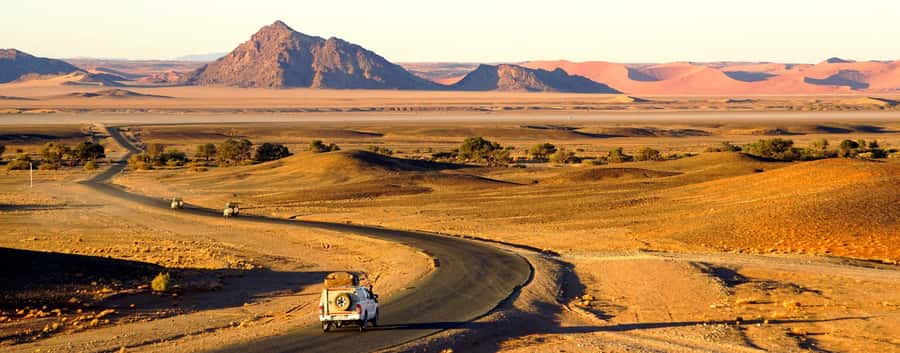
Namibia rewards pace. The best moments often happen when you slow down for a view, a roadside stop, or a long look at wildlife and desert details, then decide what to explore next. This audio guide is built for that style: you drive your route, and the information comes to you when you need it.
I also like how it keeps learning practical. Instead of flipping through a book at the wrong time, you get nature, culture, wildlife, and history background that matches what you are already passing. It turns the car into a moving learning space—without forcing you into group timing.
You can also shape the experience to your mood. Want short bursts as you drive? Pick single audios on the map. Want a more guided-feeling ride? Use auto-play so it keeps feeding you context as you go.
Getting sound in the car: phone-to-radio is the real win
This is not just a phone app you keep to yourself. The experience is designed around connecting your smartphone to your rental car’s audio system, so everyone can listen through the speakers. That matters on long Namibian stretches when you have time to talk, point, and react together.
You’ll want to think about power and volume before you leave town. A charged phone is required, and you’ll get the smoothest experience if the connection is stable. If you are traveling with multiple people, remember the guide is sold per smartphone—so plan who has the phone, and make sure everyone can hear clearly.
There’s also a simple peace-of-mind element: you are not trying to read tiny screens while driving. Audio keeps your eyes on the road and gives you information without turning every stop into a research project.
How the GPS map control works while you drive
The guide is built around location. You can use the GPS so the app helps you decide what to play, either from a map view or from a list of files. In plain terms: you are not hunting through content menus while you are out in the open road.
This is exactly the kind of design that helps you stay oriented, especially in places where signs are sparse and distances feel huge. One of the biggest benefits is that you can call up relevant information fast—so you spend more time looking at Namibia and less time navigating your audio choices.
Two listening modes make it flexible:
- Single audios on the map, for targeted moments
- Automatic playback, for a more continuous ride
If you like structure, auto-play can feel like an invisible guide riding along. If you prefer freedom, single-audio lets you steer your own pace.
What the guide covers: Kaokoland to Fish River Canyon, in story-sized chunks
The audio guide spans Namibia from Kaokoland in the north down to Fish River Canyon in the south. It also includes major stops that most self-drive routes touch, like Etosha National Park, Windhoek, and Swakopmund.
Instead of treating these places like checkboxes, the content focuses on background you can actually use while you are there—nature and wildlife context, plus culture and history. That means you are not just seeing a place, you are understanding why it looks the way it does and what to pay attention to as you drive through.
Here’s how the coverage tends to feel as you plan your route:
Kaokoland: start with a sense of place
Kaokoland is the kind of region where you notice everything more slowly—light, terrain, distance, and the way communities live in and with the land. The guide’s “nature plus culture plus history” approach fits that kind of travel, because you get context before you move on.
Practically, Kaokoland is a good area to use either auto-play or a couple of carefully chosen audios. That keeps you from flooding your brain early, while still building a baseline understanding.
Etosha National Park: wildlife with context in your ears
Etosha National Park is one of Namibia’s big wildlife anchors, and this guide includes it in the audio set. The value here is that the audio background can help you interpret what you are seeing—nature and wildlife information delivered at the moment it matters.
I also like that the guide does not force you into one kind of “wildlife experience.” If you are spending more time scanning for animals, audio can provide story and explanation. If you’re doing scenic stops and short walks, you can switch to single audios when you want a specific theme.
Windhoek: transition from big nature to human scale
Windhoek is where your trip often shifts gears—from wide-open distances to a more city-like rhythm. Having audio content for Windhoek helps you connect the dots between Namibia’s landscapes and the people and places you pass through.
This is the area where you may want to listen in a calmer way. You can use the app as you drive around or park for short breaks, picking audios that match what you’re seeing outside the window.
Swakopmund: when the coast changes the conversation
Swakopmund brings you the coastal angle of Namibia, and the guide includes it as well. Even if you only spend part of a day here, audio helps you keep the story going—so the coast feels like more than a scenic pause.
Because you can switch between single-audio and auto-play, you can keep your listening light while still learning. It’s a good fit if you want to balance ocean time with real background.
Fish River Canyon: save the broad finale for the finale
Fish River Canyon is mentioned as a south-end highlight, and the guide covers it too. This kind of place benefits from “slow looking,” and audio can support that by giving you context so your stops feel more meaningful than just dramatic views.
If your route is north-to-south, this is where the audio content can feel like a capstone—tying earlier nature and history threads to the final dramatic scenery.
Choosing what to play: 225 audio files and about 10 hours
You get 225 audio files and roughly 10 hours of content. That is plenty for a slow, thoughtful drive, but it can also be overwhelming if you treat it like a to-do list. The smart move is to plan around your actual driving rhythm.
Here are two practical ways to use the time:
- Use auto-play when you want the ride to feel guided and you have fewer stops planned.
- Use single audios when you are stopping for viewpoints, city moments, or wildlife scanning and you want the most relevant explanation.
Because the guide is location-aware, you are not wasting time picking topics far from where you are. That makes the listening time more efficient, which matters on a long trip when you want daylight for the driving itself.
English and German switching: clarity matters out on the road
This audio guide comes in English and German, and the app lets you switch language. That is helpful if you have a mixed-language group, or if you want to compare explanations in two ways.
I also like that the audio style is designed to keep you engaged without turning the experience into a monotone lecture. One of the notes from user feedback points to the explanations feeling clear and neutral, which is a big deal when you are listening for hours.
If you are the type who gets annoyed by “too much talk,” the single-audio option is your friend. You control how much you hear and when.
Price and value: $29 per person, but per smartphone for the voucher
The headline price is $29 per person, but the voucher code is valid for one smartphone. That sounds small on paper, yet it changes the value math for groups.
Here’s how to think about it:
- If you are traveling solo, it can feel like a straightforward add-on that turns your drive into a guided tour.
- If you are traveling with others, your real cost is about how many smartphones you bring (since the guide can be listened to via the car speakers from the connected phone).
So the best value is often when everyone shares one phone for audio. The setup is explicitly designed for that: connect your phone to the car radio and everyone inside can listen.
Also note the timing: the offer is valid for 365 days, and the audio guide is said to be valid forever after purchase. That’s useful if you want to plan around route changes, weather, or spare days.
What’s not included, and why that’s normal for self-drive
This guide covers the audio experience, not the trip logistics. It does not include transportation, entry fees, or parking fees.
That matters because Namibia self-drive usually has its own budget categories. You should expect to pay for park access and any places you stop where fees apply, and you should plan for parking on arrival at towns and viewpoints.
The upside is that you stay flexible. You are not locked into one route or one group schedule, and you only pay for what you actually enter.
Getting set up after booking: the email you should watch for
After booking, you receive instructions by email on how to install and activate the guide. The guidance says you can ignore the GetYourGuide app or ticket email, and you should also check your spam folder in case the email lands there.
This is an important practical step. If you are starting a drive soon after purchase, do the download and setup before you hit areas with weak internet. One piece of feedback highlights that internet access in Namibia can be limited, so it’s worth making sure the download does not get interrupted.
A simple routine helps: charge your phone fully, install the app, verify it plays, then start your route with confidence.
Who should book this (and who might skip it)
You’ll likely love this if:
- You are doing a self-drive and want a guide without meeting points
- You prefer learning on your own schedule while keeping your eyes on the road
- You want English or German audio that you can share through the car speakers
- You like controlling the flow, using GPS map selection or auto-play
You might skip it if:
- You want a live human guide on the spot
- You have no interest in listening while driving or you expect very frequent phone issues
- You plan to use multiple smartphones in different cars without coordinating the voucher
It’s also described as wheelchair accessible, which is good to know for the app setup and overall suitability.
Should you book this Namibia self-driving audio guide?
If your goal is “learn while you drive,” this is a strong fit. The GPS map control, the option to run audio automatically or pick individual files, and the car-speaker connection make it more than a background gimmick—it’s a real way to turn time on the road into meaningful learning.
The main caution is simple: manage your smartphone carefully. Plan for one smartphone per voucher, keep it charged, and handle the install and download well before you’re out in low-signal areas.
If that sounds doable, booking is an easy yes for many self-drive travelers. You’ll spend more time looking at Namibia—and less time wondering what you are seeing.
FAQ
Is there a fixed meeting point for this self-driving audio guide?
No. This is a self-guided tour with no fixed meeting point or end. You can start your trip wherever you want.
What languages are available in the audio guide?
The audio guide is available in English and German, and you can switch language in the app.
How much audio content do I get?
You get 225 audio files with around 10 hours of content.
Can I listen through the rental car’s audio system?
Yes. The setup allows you to connect your phone to the car radio so everyone in the car can listen through the speakers.
Is the voucher code valid per person or per smartphone?
The voucher code is valid for one smartphone. The guide is priced per smartphone, even if you have multiple people in the car.
How do I install and activate the guide after booking?
After booking, you receive a separate email with download and activation instructions. You should check your spam folder if you don’t see it.
Which parts of Namibia does the guide cover?
It covers highlights across Namibia, including Kaokoland, Etosha National Park, Windhoek, Swakopmund, and Fish River Canyon, plus additional stops and background information.
Does the price include entry fees and parking?
No. Entry fees and parking fees are not included.
How long is it valid, and can I cancel?
It’s available with 365 days validity, and the audio guide is described as valid forever after purchase. Free cancellation is available up to 24 hours in advance for a full refund.