REVIEW · ANNAPOLIS
Awesome Scavenger Hunt: Annapolis Red Bricks & Blue Views
Book on Viator →Operated by Let's Roam · Bookable on Viator
Annapolis becomes a puzzle map. This app-led scavenger hunt sends you hunting clues around key landmarks, with trivia, problem-solving, and photo challenges that keep the city feeling interactive instead of sightseeing-by-checklist. You can start when you want, and your phone becomes the navigator and game master for about 1.5 to 2 hours.
I especially like the self-guided format—no tour guide schedule to match, so you can move at your group’s pace. I also like that the hunt pushes you to look closely for the kinds of details you’d normally miss, plus it adds photo challenges with points, which turns the walk into friendly competition.
One caution: the experience depends heavily on the app and ticket check-in working smoothly. In past runs, some people reported issues like needing multiple app installs or not being recognized on-site, which can make the start frustrating if you’re not ready with a charged device.
In This Review
- Key things to know before you go
- Annapolis Red Bricks & Blue Views: A City Puzzle You Control
- Price and What You Actually Get for $14.99
- How the Let’s Roam App Hunt Works on Your Phone
- Your Annapolis Route: From the Kunta Kinte–Alex Haley Memorial to the State House
- Stop 1: Kunta Kinte – Alex Haley Memorial
- Stop 2: James Brice House
- Stop 3: Maryland State House
- Photo Challenges and Team Scoring: Winning Without Being a Pro
- Navigation, Comfort, and Weather: The Practical Stuff That Makes or Breaks It
- When This Hunt Works Best (and How to Avoid the Frustrating Starts)
- Should You Book This Annapolis App Hunt?
- FAQ
- FAQ
- How long is the scavenger hunt in Annapolis?
- Can I start the hunt whenever I want?
- Where do I start the hunt?
- What are the stops on the route?
- What do I need to download or use to participate?
- What’s included in the price?
- What costs are not included?
- Are there any age limits?
- Are service animals allowed?
- Do I need a charged phone before I go?
- What’s the cancellation policy?
Key things to know before you go

- Start anytime in your window: You can begin whenever you wish and finish back at the meeting point.
- Your phone runs the show: The Let’s Roam app guides you through challenges and navigation.
- Trivia + problem-solving: You’ll answer questions and solve tasks you can only find in person.
- Photo missions earn points: Each person gets a role, and you’ll compete on the app leaderboard.
- Only the app is included: You still plan for parking, snacks, and any entrance fees you might encounter.
Annapolis Red Bricks & Blue Views: A City Puzzle You Control

If you like your sightseeing with a little structure and a little chaos (the fun kind), this hunt fits that mood. You’re not just walking between famous-looking stops. You’re collecting clues, answering trivia, and doing on-the-spot tasks tied to what you can physically see at each location.
The best part is how flexible it feels. You don’t need a specific group departure time or a guide briefing. You can start on your schedule, then let the app steer you through. For a city like Annapolis—where the streets are compact and landmarks feel close together—that flexibility matters. You can pause for photos, regroup with friends, and still finish within the typical 1.5 to 2-hour range.
That also helps if you’re going with colleagues or a mixed group. People can fan out during photo moments, then come back together for answers. It’s the kind of activity that works when someone in your group gets bored by standard tours but still enjoys learning facts.
Price and What You Actually Get for $14.99
At $14.99 per person, this is priced like an activity first, not a heritage tour. You’re paying for the game wrapper: the Let’s Roam app access and the mission format that turns landmarks into prompts.
What you should know is what’s not included. Parking, food, transportation, and any entrance tickets are not part of the price. So think of this as the “app-run scavenger hunt” portion, not a day ticket that automatically covers museum admissions. If you’re parking in Annapolis, plan extra time and budget. If you’re using public transportation, that’s fine too since the activity is listed as near public transit—but you’ll still need to handle your own getting-there costs.
In terms of value, you’re essentially buying:
- a timed city experience (about 1.5–2 hours),
- an interactive trivia and photo system,
- and the chance to compete with your team or others on the leaderboard.
If your goal is just to see Annapolis’s big sights, you might find cheaper ways to do it. But if your goal is to get more out of the streets through tasks, this can feel like a bargain—especially if you’re traveling with people who enjoy challenges.
Also, it’s commonly booked about 8 days in advance, so if your group has a specific day and time preference, don’t wait until the last minute.
How the Let’s Roam App Hunt Works on Your Phone

This is an app-led, self-guided hunt, and that affects how you should prepare.
Here’s the flow:
- Buy tickets on the website.
- Download the Let’s Roam app from the App Store or Google Play.
- Register and redeem your ticket inside the app.
- Follow the app’s step-by-step guidance and texted photo challenges.
Your phone handles navigation and tasks. It also means your device needs to be ready. The guidance is very clear: make sure your smartphone is fully charged before you start. If your battery doesn’t usually last through a full afternoon, bring a power bank. You’ll want your camera and the app working without interruptions.
On the ground, the hunt is designed to make you look for the kinds of details you can’t guess from a brochure: trivia questions hidden on plaques, statues, and other visible markers near the stops. That’s how you get the “found it in person” feeling.
One more practical note: this runs like a private activity for your group only. So you’re not dealing with strangers merging into your team mid-hunt.
Your Annapolis Route: From the Kunta Kinte–Alex Haley Memorial to the State House

The hunt takes you past three named stops, and it ends back at the start. The listed meeting point is 100 State Cir, Annapolis, MD 21401, and the activity runs during listed hours of 8:00 AM to 5:00 PM (daily). Even though the hunt is self-guided and you can start at your preferred time, I’d aim to begin early enough that key places are active and you’re not rushing to finish.
The route is short enough that the mission feels doable without a marathon pace. You do need moderate physical fitness, and comfortable shoes are a must.
Stop 1: Kunta Kinte – Alex Haley Memorial
You start at the Kunta Kinte–Alex Haley Memorial, which sets a reflective tone right away. For the game side, this is where you get into the rhythm: reading what’s in front of you, solving an initial question, and using the app prompts to decide where to go next.
For me, the advantage of starting with a memorial is simple: it encourages you to slow down and actually pay attention. In a scavenger hunt, that’s half the battle. You’ll be looking for text or features the trivia is based on, and that makes the start feel more meaningful than just crossing off Stop 1.
If you’re traveling with mixed ages, this is also a good “get everyone on board” point because the tasks likely push observation rather than pure hiking.
Stop 2: James Brice House
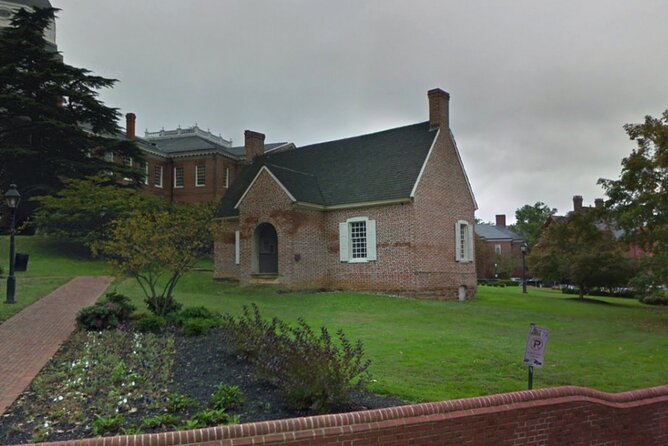
Next up is the James Brice House. This is where the hunt’s “look for details” style tends to shine. In an app format like this, the questions you answer are often tied to plaques, labels, or nearby features—things you’d miss if you only glanced and kept walking.
This stop is also a likely place for role-based photo tasks, since the hunt assigns interactive roles and sends texted photo challenges to the group. If you want the team competition element to feel fun rather than awkward, this is where you start thinking like the game: Who’s taking the picture? Who’s checking the clue? Who’s reading the app prompt out loud?
A small drawback to consider: if your phone signal is spotty or your battery dips, you’ll feel it more here because you’ll want the app while you’re standing in front of a clue.
Stop 3: Maryland State House
Your final landmark is the Maryland State House. Finishing at a major civic building usually gives the last stretch a sense of momentum. It’s the kind of place where the questions and missions can feel like a proper capstone, not just another stop.
This is also where you’ll likely do the final round of trivia or tasks and wrap up the photo challenges. If your group does well under pressure, this is the finish line you’ll want to sprint toward. If you do better with a calmer pace, you’ll appreciate that you can still work at your own speed since there’s no guide trying to keep you moving.
Then the activity ends back at the meeting point.
Photo Challenges and Team Scoring: Winning Without Being a Pro
One of the coolest things about this hunt isn’t just that there are questions—it’s that the game expects you to take part in it visually. Each person has an interactive role and you’ll get texted photo challenges. You earn points for the best photos and you can compete with your team or others on the app leaderboard.
That said, you don’t need to be a photographer. You just need a smart approach:
- Take a few versions of each photo challenge, not just one.
- Follow the app prompt closely (framing and what’s included usually matters).
- Assign roles quickly so the person with the phone isn’t juggling directions and camera at the same time.
I also like that this format works for groups. Even if one person is slower at trivia, they can still contribute through photos or by reading the clue text aloud. That keeps the hunt from turning into a two-person activity inside the team.
Navigation, Comfort, and Weather: The Practical Stuff That Makes or Breaks It

This is a walking activity. Even though it’s self-guided, you still need to show up ready to move. Here are the essentials that keep the experience smooth:
- Wear comfortable shoes. You’re strolling between downtown points and stopping often to read and answer.
- Check the forecast and dress appropriately. It’s explicitly recommended, because the mission happens outside.
- Keep your phone charged. Bring a power bank if needed.
- Use public transit if you want, but plan your start. It’s listed as near public transportation, yet parking and transit logistics are still on you.
Because you can start at any time you wish, you can also choose a time when the weather is kind. If it’s hot, start earlier. If it’s rainy, bring a light layer and consider water-resistant footwear.
One more practical tip: don’t assume the app will magically recognize your presence immediately if something is off. In at least one reported case, the hunt didn’t appear to pick up that someone had arrived and they had to check in again. If that happens, stay calm, check your app status, and contact support if needed.
When This Hunt Works Best (and How to Avoid the Frustrating Starts)

This scavenger hunt is a great fit if:
- you like trivia and light problem-solving,
- your group enjoys friendly competition,
- you want an organized way to experience Annapolis without a fixed tour schedule,
- and you’re comfortable using your phone as the main guide.
It may frustrate you if:
- your phone struggles with app logins,
- your battery is unreliable,
- or you expect a highly polished, no-technical-issues experience.
The review pattern here is telling. Some people loved the idea of the app challenge, but others ran into tech issues: one person described installing two different apps and having a ticket number rejected multiple times, then getting stuck on hold during support calls and ultimately giving up. Another person found the ground instructions confusing and said they had to do extra checking in because the system didn’t seem to recognize their arrival.
So how do you reduce the risk? Do these before you head out:
- Download the Let’s Roam app ahead of time.
- Make sure the ticket is properly redeemed in the app before you reach the start.
- Use your phone for a few minutes at home or outside Wi-Fi to confirm it’s working.
- Keep the device charged and ready for camera tasks.
If something does go wrong, there’s a direct support path. In responses, the provider pointed people to [email protected] for help. That’s the right move when the problem is ticket redemption or app functionality.
Also remember: you’re booking an app-based experience. It can be a blast, but you’ll want a bit of patience and basic tech readiness.
Should You Book This Annapolis App Hunt?

I’d book it if you want a fun, structured way to explore Annapolis with your own pace, and you know your group will enjoy trivia and photo missions more than passive museum-style sightseeing. The $14.99 price feels reasonable for a 1.5–2 hour activity when you’re getting both navigation and challenge prompts in one app.
I would think twice if you’re traveling with people who hate apps or you’re concerned about your phone reliability. If your group is the type that needs everything to work perfectly at the first attempt, the reported ticket check-in problems are worth taking seriously. Bring a charged phone, follow the instructions carefully, and plan a reasonable start time within the listed hours so you’re not rushing.
If you’re flexible, enjoy solving clues, and want your walk through Annapolis to feel like a game instead of a route, this is a solid pick.
FAQ
FAQ
How long is the scavenger hunt in Annapolis?
It typically lasts about 2 hours, with the hunt itself running roughly 1.5 to 2 hours.
Can I start the hunt whenever I want?
Yes. It’s self-guided, and you can start at any time you wish.
Where do I start the hunt?
The start and end point is at 100 State Cir, Annapolis, MD 21401, USA.
What are the stops on the route?
The hunt includes: Kunta Kinte–Alex Haley Memorial, James Brice House, and Maryland State House.
What do I need to download or use to participate?
You’ll need the Let’s Roam app. You download it from the App Store or Play Store, then register and redeem your ticket there.
What’s included in the price?
The included item is Let’s Roam app access.
What costs are not included?
Not included are parking and parking fees, admission tickets to entrances, food and beverages, personal expenses, transportation costs, and any additional paid attractions.
Are there any age limits?
No minimum age is required.
Are service animals allowed?
Yes, service animals are allowed.
Do I need a charged phone before I go?
Yes. You should make sure your smartphone is fully charged before the tour, and you should bring a power bank if you need one.
What’s the cancellation policy?
You can cancel for a full refund up to 24 hours before the experience’s start time. If you cancel within 24 hours of the start time, the amount paid is not refunded.